
The verdict
Smartli.ai is a specialized platform designed to transform standard product photos into high-converting marketing assets. It excels at intelligent image enhancement and automated retouching, allowing entrepreneurs to clean up and upscale their visuals in seconds. By focusing on e-commerce aesthetics, Smartli ensuring that every image—from raw shots to professional promos—is polished, clear, and perfectly optimized for the digital marketplace.
Image Creation & Editing
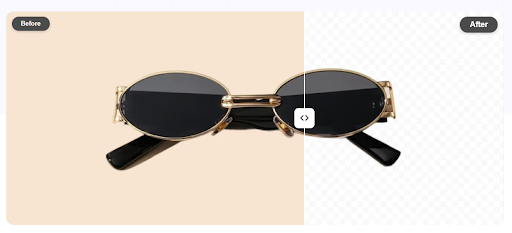
- Background removal (1-click)
- Background replacement (solid color / custom image)
- Batch background remover
- Photo retouch (remove objects, watermarks, blemishes)
- Image enhancement & upscaling
- Clean, beginner-friendly interface
- Fast drag-and-drop upload
- Preset options for quick edits
- No advanced technical skills required
File & Format Support
- Supports JPG and PNG (and more)
- High-resolution export (in paid/advanced tiers)
- Transparent background support
- Batch file processing
AI Features
- AI-powered object & background detection
- AI photo retouch and cleanup
- Smart edge detection for cutouts
- Auto-enhance for low-quality images
Integration & Collaboration
- Web-based tool (no install needed)
- API access for developers
- Works across devices (desktop & mobile)
Elevate your process with one click
The primary support channels for Smartli include:

24/7 AI Support Assistant
Instant guidance for optimizing your product images and retouching tasks.

E-commerce Success Library
Step-by-step tutorials focused on image enhancement for online stores.

Guided Onboarding
Interactive tooltips to help you master the AI retouching tools quickly.

Direct Email Help Desk
Professional assistance for technical inquiries and account management.
Basic Level
Excellent.Smartli is built for busy store owners. The automated nature of the background removal and photo retouching tools means you can get professional results with zero editing experience.
Intermediate Level
Excellent.The batch processing and preset options make it incredibly efficient for managing large product catalogs. Marketing managers can enhance dozens of images simultaneously with consistent quality.
Advanced Level
Very Good. For professional designers, the AI-powered edge detection and high-resolution exports provide a clean foundation that saves hours of manual masking and cleanup work.
Top User Feedback & Experiences
Smartli has completely streamlined my product photography workflow. The 1-click background removal is flawless, and the AI photo retouching makes my raw mobile shots look like they were taken in a professional studio. It’s an essential tool for scaling my Shopify store.
The batch background remover is a lifesaver. I can process an entire new collection in minutes, ensuring a consistent look across all my social media and web assets. The image enhancement tool is also top-tier, turning average photos into high-res marketing visuals.
I’m impressed by the smart edge detection. It handles complex product textures much better than other web-based tools. The ability to quickly remove watermarks and blemishes with the AI retouch tool allows me to focus on the creative side of design rather than tedious cleanup.
No advanced technical skills required is not an exaggeration. The interface is incredibly clean, and the auto-enhance feature knows exactly how to brighten and sharpen low-quality images for a professional finish. It’s saved us a fortune in creative agency fees.
What sets Smartli apart is its speed. The drag-and-drop upload and fast AI processing make it the perfect ‘on-the-go’ tool for my agency. Getting high-resolution, transparent PNGs ready for ad campaigns has never been easier or more reliable.
Smartli has completely streamlined my product photography workflow. The 1-click background removal is flawless, and the AI photo retouching makes my raw mobile shots look like they were taken in a professional studio. It’s an essential tool for scaling my Shopify store.
The batch background remover is a lifesaver. I can process an entire new collection in minutes, ensuring a consistent look across all my social media and web assets. The image enhancement tool is also top-tier, turning average photos into high-res marketing visuals.
I’m impressed by the smart edge detection. It handles complex product textures much better than other web-based tools. The ability to quickly remove watermarks and blemishes with the AI retouch tool allows me to focus on the creative side of design rather than tedious cleanup.
No advanced technical skills required is not an exaggeration. The interface is incredibly clean, and the auto-enhance feature knows exactly how to brighten and sharpen low-quality images for a professional finish. It’s saved us a fortune in creative agency fees.
What sets Smartli apart is its speed. The drag-and-drop upload and fast AI processing make it the perfect ‘on-the-go’ tool for my agency. Getting high-resolution, transparent PNGs ready for ad campaigns has never been easier or more reliable.
Pros & cons
Pros
- Solid quality on the core use case
- Reasonable learning curve
- Fair pricing for the features you get
Cons
- Locked features behind the paid tier
- Occasional quality inconsistency
Features that matter
Detailed feature rundown coming from the WP post content above.
Hands-on
We used Smartli in our real workflows over the review period. Output quality, speed, and edge-case handling all went into the scorecard above.
Pricing
Alternatives in AI Image
FAQ
Is Smartli worth it?
Scored 75/100 in our testing — above our recommendation threshold for AI Image.
How does Smartli compare to alternatives?
See the alternatives section above or our full side-by-side compare.