How to Vibe Code in 2026: Build Your First App by Describing It (Beginner Guide)
A plain-English beginner guide to vibe coding: what it means, how to pick a tool, write your first prompt, iterate in small steps, and test logins, data and payments before you share your app.

Affiliate disclosure: Some links on this page are affiliate links. Top10AI may earn a commission if you sign up through them, at no extra cost to you. Only the Base44 and Bubble “try” links marked as partner links are affiliate links; every other link is a plain link. See how we rate for the editorial policy.
Vibe coding means building software by describing what you want in plain English and letting an AI tool write the code. You don’t need to be a developer to try it. You need an idea, a tool, and about an hour. This guide walks you through it step by step: what the term means, how to pick a tool, how to write your first prompt, how to change things without breaking them, and how to check your app is safe before anyone else uses it.
This is a how-to guide, checked 16 Nov 2026. It is not a ranking. Plan details come from each vendor’s own pricing page or documentation on that date. Top10AI did not trial these tools for this article and gives no badges or star ratings here. If you want a side-by-side comparison of tools, see our vibe coding tools comparison. This page is about how to do it.
The short version
- Pick one small idea. A tracker, a booking form, a simple internal tool. Not a whole business.
- Pick a tool that fits you. If you have never written code, start with a no-code AI app builder such as Base44 or Bubble, because hosting, logins and a database are built in. If you are comfortable with files and a terminal, an AI code editor such as Cursor or Claude Code gives you more control.
- Write a first prompt that says what the app is, who it is for, and the three main things people can do.
- Change one thing per prompt, check it, and keep notes.
- Test logins, data and payments before you share the link, and run the tool’s security scan.
What vibe coding means
The term comes from AI researcher Andrej Karpathy. In an X post on 2 February 2025, he wrote: “There’s a new kind of coding I call ‘vibe coding’, where you fully give in to the vibes, embrace exponentials, and forget that the code even exists.” He described talking to an AI coding tool, accepting its changes without reading them, and pasting error messages back in until things worked. He also added an honest caveat in the same post: it was “not too bad for throwaway weekend projects”.
The phrase spread fast. Collins Dictionary named vibe coding its Word of the Year 2025 (announced 6 November 2025), describing it as “the use of artificial intelligence prompted by natural language to write computer code”. Collins summed it up as “telling a machine what you want rather than painstakingly coding it yourself”, and noted that tech experts “debate whether it’s revolutionary or reckless”.
That debate is still going on. The fair summary is this: vibe coding is a fast way to get a working first version of an idea. It is not a shortcut around testing, security, or the work of keeping an app running once real people depend on it. The rest of this guide is built around both halves of that sentence.
Where it works well, and where it struggles
- Usually a good fit: prototypes you want to show someone, personal tools, simple internal apps for a small team, landing pages, and “can this idea work at all?” experiments.
- Needs more care: anything that stores other people’s personal data, takes payments, handles health or financial information, or has to keep working for many users. You can still start with vibe coding, but plan for proper review (see the last two sections).
What you need before you start
Less than you might think. Here is the full list.
- One small, specific idea. “An app where my yoga clients can book a class and get a confirmation email” is a good first project. “A marketplace like Airbnb” is not. Small ideas finish; big ones stall halfway.
- A clear picture of who will use it. Just you? Your team? Strangers on the internet? This changes how careful you need to be with logins and data.
- A tool account. Most tools in this guide have a free starting plan (details below), so you can try before you pay.
- About an hour of focused time for a first version, plus more time later to test and polish. How long your project takes depends on the idea and the tool; nobody can promise a build time.
- A notes file. A plain document where you write down what you asked for, what worked and what you changed. This sounds boring. It is the single habit that saves beginners the most frustration.
- No secrets in your prompts. Don’t paste passwords, API keys or real customer data into the chat while you build. Use fake test data.
Step 1: Choose your tool
There are two main kinds of vibe coding tools. The right one depends less on which is “better” and more on how comfortable you are with code.
Option A: No-code AI app builders (easiest first step)
You type what you want in a chat box, and the builder creates a working app in your browser, including the parts beginners usually get stuck on: a database, user logins and hosting. You never have to install anything. This is why we suggest it as the first step for non-developers: there are fewer moving parts to go wrong.
Base44. Base44 describes itself as a no-code AI platform that “uses vibe coding to build fully-functional apps and websites”. You describe what you need in plain language, and it builds the frontend, backend, database and user authentication. According to Base44’s pricing page (checked 16 Nov 2026):
- The Free plan is $0 and includes 25 message credits a month, 100 integration credits, up to 5 apps, and authentication, database and analytics.
- Paid plans start with Starter at $16/month, billed annually (100 message credits a month). Builder, Pro and Elite add more credits and features. Base44 says yearly billing saves 20%.
- Base44 says you own what you build (code, data and users) and that GitHub sync can export the source code. On the pricing page, the GitHub integration is listed from the Builder plan up.
- Base44’s documentation says its security scan is available on all plans, including Free.
The pricing page was also showing a time-limited sale when we checked. We have left that out because promotions change; confirm the current price on Base44’s page.
Bubble. Bubble combines AI with a visual editor: its manual describes turning “your ideas into apps by combining the power of AI and visual development”. You can describe an app to get started, then adjust it by clicking and dragging as well as by prompting. According to Bubble’s pricing page (web plans, checked 16 Nov 2026):
- The Free plan is $0/month with 500 AI credits a month and a development version of your app. Bubble’s FAQ says app generation does not currently use credits.
- Starter is $32/month, billed annually, and is the first plan that lists a live website and a custom domain. Growth and Team plans add more capacity and editors.
- Bubble also sells mobile and web-plus-mobile plans; check the page if you want an iOS or Android app.
How to choose between them as a beginner: Base44 is chat-first, so it suits you if you want to describe things and let the tool handle the structure. Bubble leans more on a visual editor alongside the AI, so it suits you if you like to see and move the pieces yourself. Both let you start free. If you want a deeper comparison of app builders, read our AI app builder guide, Base44 vs Lovable, or Lovable alternatives.
Option B: AI code editors (for people OK with code)
These tools work on real code files on your computer or in the cloud. You still describe what you want in plain English, but you see the code, and you are responsible for running and hosting it. They are more flexible and less “boxed in”, but there is more to learn: installing things, using a terminal, and deploying your app somewhere.
- Cursor is an AI code editor. Karpathy’s original post mentioned using Cursor’s Composer feature. Plans and limits change often, so check Cursor’s pricing page, and read our Cursor AI review for what it is like to use.
- Claude Code is Anthropic’s coding tool. Its official documentation describes it as “an agentic coding tool that reads your codebase, edits files, runs commands, and integrates with your development tools”, available in the terminal, code editors, a desktop app and the browser. The docs say most of these require a Claude subscription or an Anthropic Console account.
A simple rule: if the words “terminal”, “repository” and “deploy” make you nervous, start with Option A. You can move to a code editor later, and tools like Base44 say you can export your code when you outgrow the builder.
Step 2: Write your first prompt
Your first prompt sets up everything that follows, but it does not have to be perfect. Base44’s own prompt guide puts it well: treat the first result “as a rough draft you can mold, not a final answer”. It suggests thinking about who the app is for, what it helps them do, and why it is useful. We have turned that into a simple template you can use in any tool.
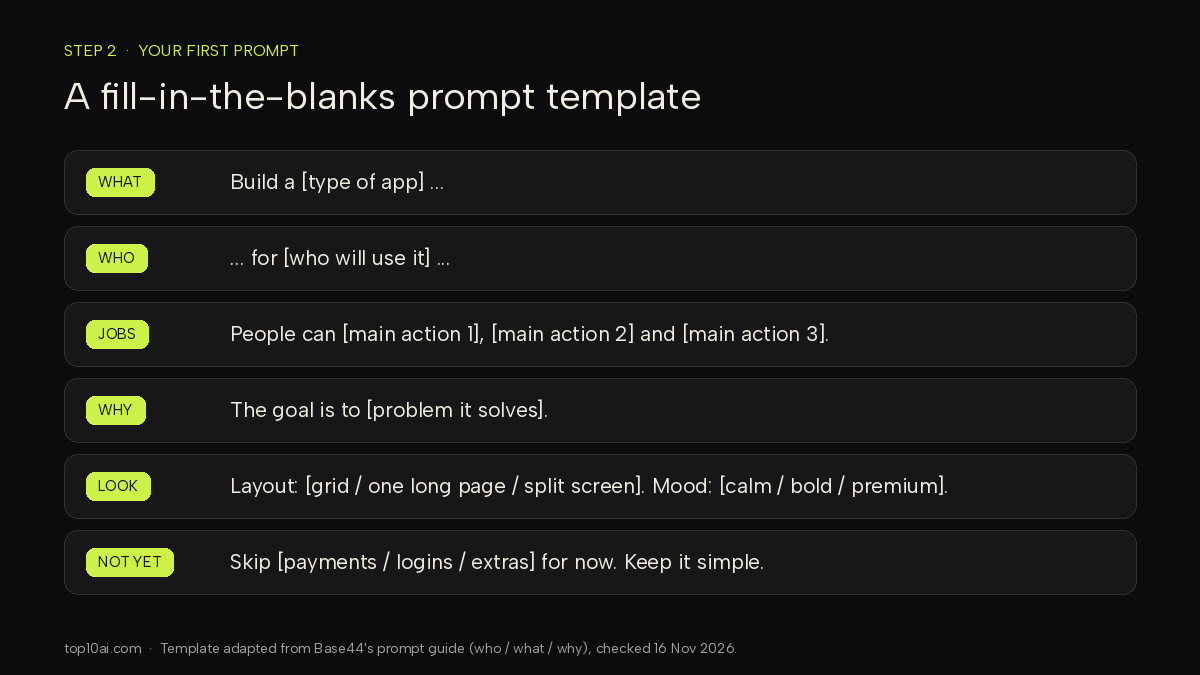
The template
Build a [type of app] for [who will use it]. People can [main action 1], [main action 2] and [main action 3]. The goal is to [problem it solves]. Layout: [grid of cards / one long page / split screen]. Mood: [calm and simple / bold and playful / dark and premium]. Don’t add [payments / extra features] yet.
An example
Build a class booking app for a small yoga studio. Clients can see this week’s classes, book a spot in a class, and cancel a booking. The studio owner can add classes and see who has booked. The goal is to stop taking bookings by text message. Layout: a simple weekly calendar with one card per class. Mood: calm and simple, with lots of white space. Don’t add payments yet.
Why this works
- It describes the screen, not just the idea. Base44’s guide notes the tool “fills in anything you leave out with its best guess”. The more concrete you are, the less it invents.
- It says why. A reason (“stop taking bookings by text message”) helps the AI make sensible choices about details you didn’t spell out.
- It holds things back. Leaving out payments on day one keeps the first version small and keeps the riskiest part for later, when you can test it properly.
Tip: several tools have a planning or discussion mode where the AI talks the idea through with you before building. Base44 calls these Plan mode and Discuss mode. If you’re unsure what you want, start there.
Step 3: Iterate in small steps
This is where most beginners go wrong. The first version appears, it is 80% of what you wanted, and you type one huge message listing fifteen changes. The AI tries to do all of them at once, something breaks, and it is hard to tell which change caused it.
Base44’s guide says it plainly: “Start with the core, get it working, then layer features on one by one.” It also notes that small, focused prompts tend to use fewer credits than broad ones that touch many pages.
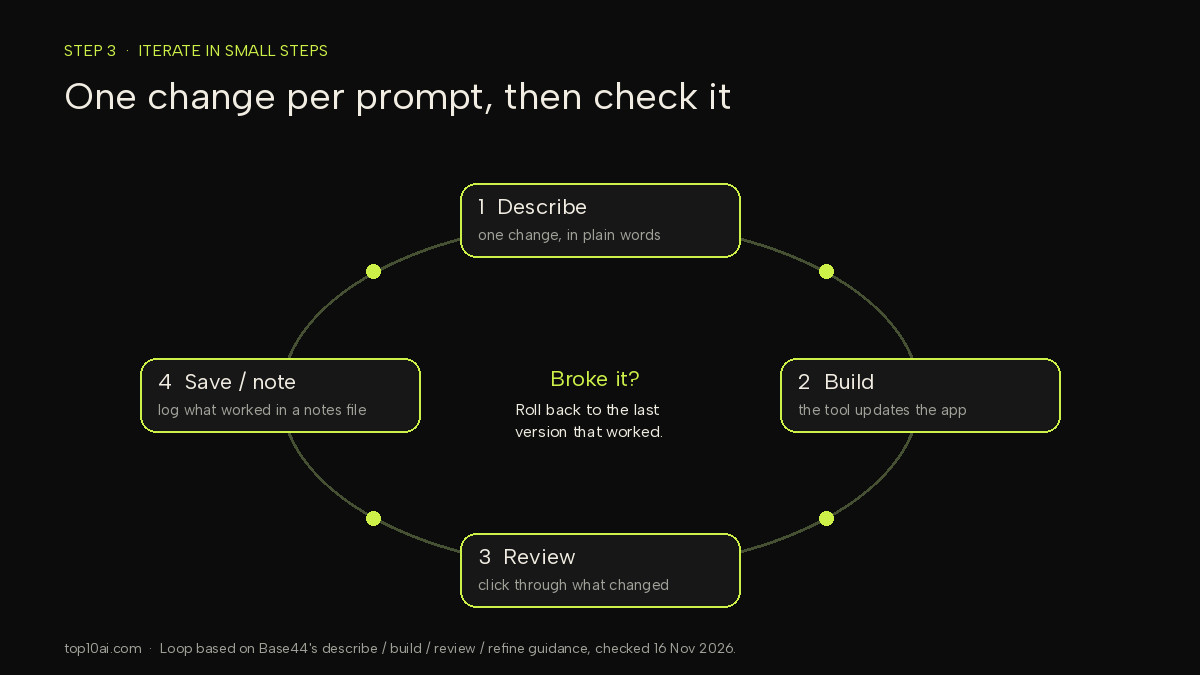
The loop
- Describe one change. “Now email the client a confirmation when they book.” Just that.
- Let it build.
- Review it yourself. Click through the app. Did it do what you asked? Did anything else change that you didn’t ask for?
- Note it. Add a line to your notes file: what you asked, what happened. If it worked, this is a safe point to come back to.
Habits that help
- Ask for the fix, not the flaw. “The homepage looks cluttered” gives the AI little to work with. “Show three classes per row and add more space between sections” tells it where to end up.
- Keep a project notes or “memory” file. Write down the app’s purpose, the rules (“only the owner can add classes”), and decisions you’ve made. When the AI seems to forget things in a long chat, paste the key points back in. Code editors such as Claude Code have their own way to store project instructions; no-code builders usually keep context in the chat.
- Paste errors back in, but read them first. Karpathy described pasting error messages straight in. That often works, but if the same error keeps coming back after two or three tries, stop and describe the problem in your own words instead.
- Know how to go back. Before big changes, make sure you know how your tool restores an earlier version. Bubble’s pricing page, for example, lists version control from its Starter plan. In a code editor, that means using Git.
Step 4: Test before you share
An app that looks right is not the same as an app that works safely. Before you send the link to anyone, spend time trying to break it. You don’t need to be a security expert for these checks. You just need a second browser window and some patience.
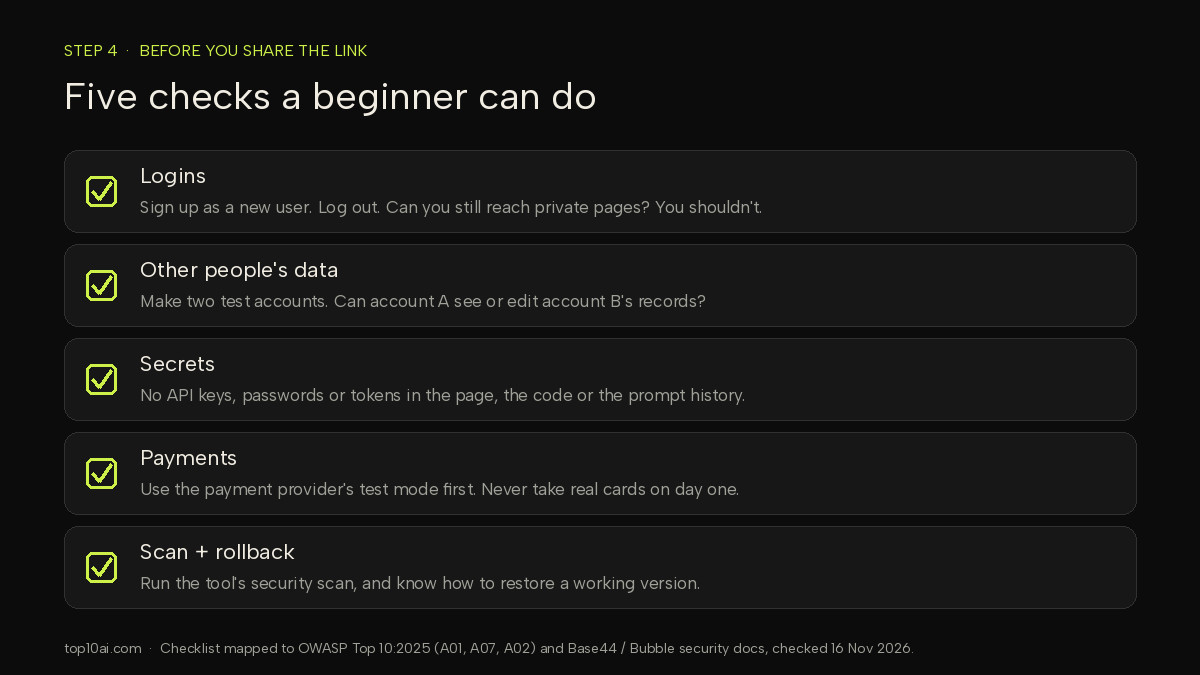
Logins
- Sign up as a brand-new user with a test email. Does it work end to end?
- Log out, then try to open a private page directly by pasting its address. You should be sent to a login page, not shown the content.
- Try a wrong password a few times. Reset your password. Check that the reset email arrives and works.
Data
- Create two test accounts. Log in as account A and try to see, edit or delete account B’s records. If you can, so can anyone else. This is the most important check on this list.
- Check what a logged-out visitor can see. Base44’s security overview, for example, lets you set an app to Private, Workspace or Public, and set data access rules so that “each person only sees their own orders or messages”.
- Use fake data while testing. Never load a real customer list into an app you haven’t checked.
Payments
- If your app takes money, connect your payment provider in its test mode first, and run a few fake purchases, refunds and cancellations.
- Make sure people only get paid features after a payment actually succeeds, not just after they click a button.
- Don’t store card numbers in your own database. Let the payment provider handle them.
Run the built-in scan
Use the security tools your platform gives you. Base44’s documentation says its security scan looks for issues “like data that is too open, credentials left in the wrong place, and login gaps”, and that the publish panel shows a security status but “doesn’t stop you from publishing”. In other words, the scan warns you; acting on it is your job. Bubble’s manual has a security section with a checklist for the same reason.
The security part nobody tells beginners
Here is the uncomfortable truth: AI tools can write working code that is not safe code. And because vibe coding encourages you to “forget that the code even exists”, you may never see the problem until someone else finds it.
This isn’t a hunch. Veracode’s 2025 GenAI Code Security Report (updated October 2025) analysed code generated by more than 100 large language models across Java, JavaScript, Python and C#, and found that AI-generated code “introduced risky security flaws in 45% of tests”. The report also says that “larger, newer AI models didn’t improve security”. That figure comes from Veracode’s controlled coding tasks, not from a survey of live apps, but the message for beginners is clear: don’t assume the AI got security right.
The OWASP Top 10:2025 is the standard awareness list of the most critical security risks to web applications. Three of its categories line up closely with the mistakes beginners make when vibe coding:
- A01 Broken Access Control. This is the “account A can see account B’s data” problem from Step 4. It is number one on the list.
- A07 Authentication Failures. Weak logins, broken password resets, pages that should require sign-in but don’t.
- A02 Security Misconfiguration. Settings left open by default, such as a database that anyone can read, or debug information shown to visitors.
Three rules to follow every time
- Keep secrets out of your code and your chat. API keys, passwords and tokens should go in the tool’s secrets or environment settings, never pasted into a prompt or written into a page. Base44’s scan, for example, specifically looks for “API keys, passwords, or tokens that have accidentally been left somewhere app visitors could find them”.
- Every private page and every piece of data needs a “who is allowed?” rule. Ask the AI directly: “Who can see and edit each type of data in this app? Make sure each user can only see their own records.” Then test it yourself with two accounts.
- The platform helps, but the app is yours. Both builders in this guide say so. Base44: “You are responsible for your app’s security settings.” Bubble: “Your app’s security is ultimately in your hands.” That is true of code editors too, only more so, because you also own the hosting.
When to stop vibe coding and hire a developer
Vibe coding can take you a long way, and many people never need more for a personal tool or a prototype. But there are clear signs it’s time to bring in someone who reads code for a living:
- Real money or sensitive data is involved. Payments, health information, financial records, or anything covered by privacy laws in your country. A professional review before launch is cheap compared with a data leak.
- You keep going in circles. The same bug comes back after every fix, or each new feature breaks an old one. That usually means the structure underneath needs rethinking, which is hard to do by prompt alone.
- You no longer understand how your app works. Karpathy himself wrote that the code “grows beyond my usual comprehension”. For a weekend project that’s fine. For something customers rely on, someone needs to understand it.
- Other people depend on it every day. Uptime, backups, performance and updates become real jobs.
- You need something the tool can’t do, such as a custom integration, unusual hosting requirements, or a compliance review.
The good news: a vibe-coded prototype is a great brief for a developer. It shows exactly what you want far better than a written description would. If your tool can export code (Base44 says it can sync your source code to GitHub), a developer can pick up from there rather than start from scratch.
FAQ
Is vibe coding free?
You can start for free. Base44’s Free plan is $0 with 25 message credits a month, and Bubble’s Free plan is $0 with 500 AI credits a month (both checked 16 Nov 2026). Free plans have limits: on Bubble, for example, a live website and custom domain are listed from the paid Starter plan. Expect to pay once you build regularly or want to publish properly.
Do I need to know how to code to vibe code?
No, not to get started. No-code AI app builders such as Base44 and Bubble are designed for people who don’t write code. Knowing a little helps you spot problems, and you still need to test your app, especially logins, data access and payments, before other people use it.
What is the best tool for beginners?
For most people who have never coded, a no-code AI app builder such as Base44 or Bubble is the easier first step, because hosting, logins and a database are built in and both have a free plan. If you are comfortable with files and a terminal, an AI code editor such as Cursor or Claude Code gives you more control. For a full comparison, see our vibe coding tools guide.
What is the best AI for vibe coding?
It depends on what you are building and how much code you want to see. Chat-first builders such as Base44 suit people who want to describe an app and let the tool handle the structure. Bubble pairs AI with a visual editor. Cursor and Claude Code work directly on code files. Try the free plan of one tool on a small project before paying.
Is a vibe-coded app safe?
Not automatically. Veracode’s 2025 GenAI Code Security Report found that AI-generated code introduced risky security flaws in 45% of its tests. Check who can see each piece of data, keep API keys and passwords out of your code, test logins with two accounts, and run your platform’s security scan before you share the app.
Related reading
- Vibe coding tools compared for non-developers
- AI app builders for non-coders
- Base44 vs Lovable
- Lovable alternatives
- Cursor AI review
Sources
- All sources accessed 16 Nov 2026 (Asia/Nicosia).
- Andrej Karpathy, original “vibe coding” post on X (2 February 2025)
- Collins Dictionary: Word of the Year 2025 (6 November 2025)
- Base44 pricing, Base44: Writing effective prompts, Base44 security overview and Base44: Running a security scan
- Bubble pricing and Bubble Manual: Security
- Claude Code documentation: Overview and Cursor pricing
- OWASP Top 10:2025
- Veracode: 2025 GenAI Code Security Report (October 2025 update)
Find the Right AI Tool for You
Not sure which tool fits your workflow? Take our 30-second finder quiz and get a recommendation.