Codex vs Claude Code (2026): Which AI Coding Agent Fits Your Work?
A plain-English guide to choosing between OpenAI's Codex and Anthropic's Claude Code: where each runs, which plans include it, how each handles planning and permissions, and when to run both. Plan facts from official pages, checked 17 Nov 2026.
Affiliate disclosure: Some links on this page are affiliate links. Top10AI may earn a commission if you sign up through them, at no extra cost to you. Only the Base44 and Bubble “try” links in the “Not a developer?” section and the quick answer are partner links; every link to OpenAI, Anthropic, GitHub and Cursor is a plain link. See how we rate for the editorial policy.
Codex and Claude Code are the two AI coding agents developers argue about most right now. Both read your code, make changes across files, run commands and hand you a result to review. Both come from an AI lab (Codex from OpenAI, Claude Code from Anthropic) and both are paid for mostly through a chat subscription you may already have. So which one should you use?
This is a plain-English decision guide, checked 17 Nov 2026. It is not a benchmark shootout. Every plan, price and feature below comes from OpenAI’s and Anthropic’s own documentation and pricing pages on that date, linked where we use them. Top10AI did not run its own tests for this article, and we give no scores, badges or star ratings here. If you want a ranked list of coding tools, see our AI coding tools guide.
Quick answer: who should pick which
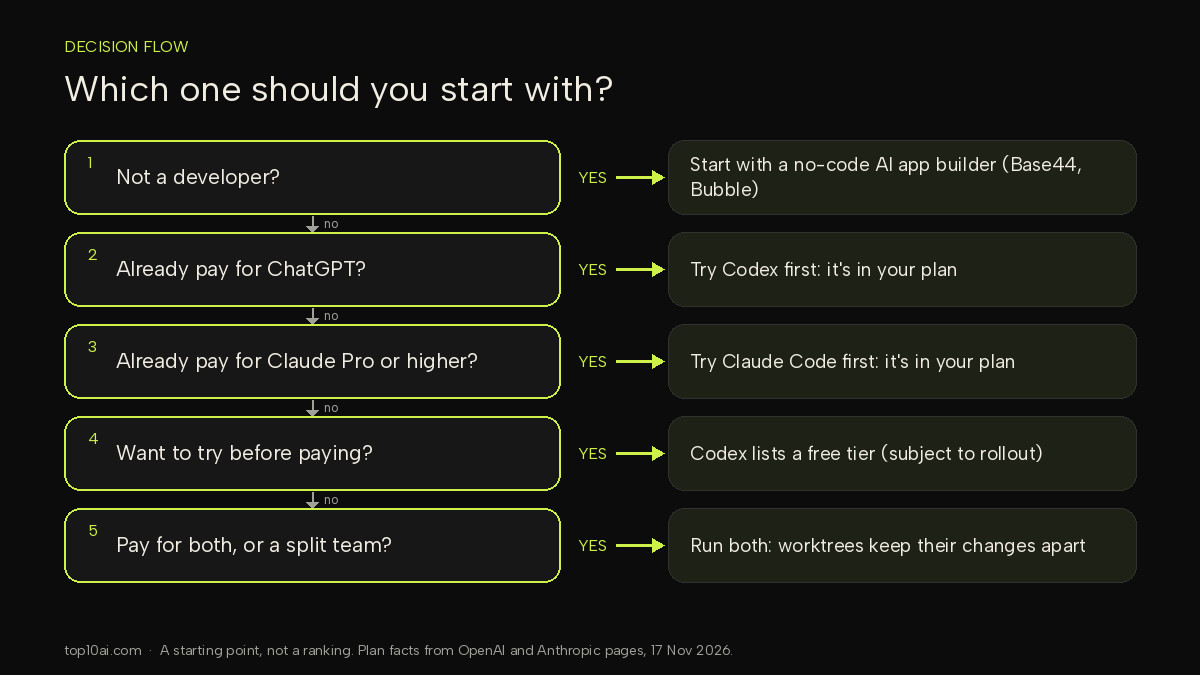
- You already pay for ChatGPT: start with Codex. OpenAI includes it in ChatGPT plans, and its pricing page lists a Free and an $8 Go tier with limited Codex access, so you can try it before you spend more.
- You already pay for Claude Pro or higher: start with Claude Code. It is included from Claude Pro up. Anthropic’s setup page says the free Claude plan does not include Claude Code.
- You want to hand off work and come back later: both can run tasks in the cloud. Codex Cloud tasks keep working “while your computer is asleep”, and Anthropic says its web version is for when you want to “Kick off long-running tasks and check back when they’re done”. The choice usually comes down to which subscription you have.
- You live in the terminal and like to approve a plan first: both work. Claude Code has a named plan mode that blocks edits until you approve a plan; Codex has a read-only mode for chatting and planning without changes.
- Your team is split: you don’t have to pick one. Some developers run both, and open-source tools such as T3 Code can drive both from one screen (see “Running both” below).
- You are not a developer: neither is the easiest first step. A no-code AI app builder such as Base44 or Bubble handles hosting, logins and the database for you.
There is no overall winner here, because the two products overlap heavily and the right choice depends mostly on which subscription you already pay for, which editor you use, and how much you want the agent to do without asking.
What Codex is and what Claude Code is
Codex (OpenAI)
Codex is OpenAI’s coding agent. It lives inside the ChatGPT product family: the Codex pricing page says ChatGPT Work and Codex “share usage” and are included in ChatGPT plans. You can use it in several places:
- Codex CLI, in your terminal. OpenAI’s CLI docs describe it as a way to “Inspect code, make changes, run commands, and automate repeatable work without leaving your terminal”. You sign in with your ChatGPT account the first time you run
codex. - Codex IDE extension, beside your code. The IDE docs list VS Code, Cursor and Windsurf, with Xcode and JetBrains IDEs offering their own integrations.
- Codex in the ChatGPT desktop app, where a chat can run locally, in a separate Git worktree, or in the cloud (Codex environments).
- Codex Cloud, on the web, desktop or mobile. The Cloud docs say each task “has its own workspace and can keep working while your computer is asleep”.
OpenAI says the Codex CLI is developed in the open on GitHub (openai/codex); its open-source page notes that the IDE extension and Codex cloud are not open source.
Claude Code (Anthropic)
Claude Code is Anthropic’s coding agent. Anthropic’s Claude Code overview calls it “an agentic coding tool that reads your codebase, edits files, runs commands, and integrates with your development tools”. It runs in:
- The terminal, described by Anthropic as the “full-featured CLI”. You run
claudein a project folder and log in on first use. - VS Code (the same extension also installs in Cursor) and JetBrains IDEs through a plugin.
- The Claude desktop app, through its Code tab, which Anthropic says includes Claude Code so you don’t need to install the CLI separately.
- The web at claude.ai/code and in the Claude app for iOS and Android, for long-running tasks and repos you don’t have locally.
Anthropic’s overview says every surface “connects to the same underlying Claude Code engine”, so project instructions (CLAUDE.md files), settings and MCP servers carry across them.
Codex vs Claude Code side by side
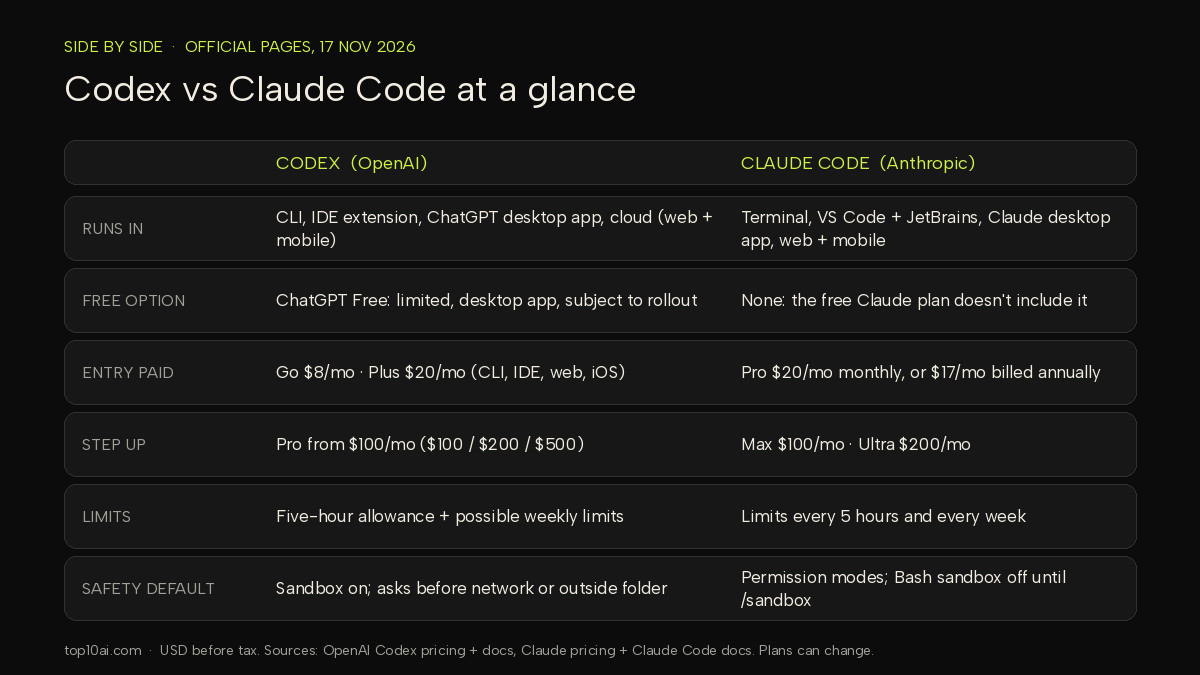
Everything in this table comes from the official pages linked under it, checked 17 Nov 2026. Prices are in US dollars, before tax, and both companies say plans and limits can change. Usage allowances on both sides depend on the model and the size of the task, so we don’t convert them into “messages” or “hours”.
| Codex (OpenAI) | Claude Code (Anthropic) | |
|---|---|---|
| Where it runs | CLI (macOS, Linux, Windows), IDE extension (VS Code, Cursor, Windsurf; Xcode and JetBrains integrations), ChatGPT desktop app, Codex Cloud on web and mobile | Terminal CLI (macOS, Linux, WSL, Windows), VS Code and Cursor extension, JetBrains plugin, Claude desktop app, web (claude.ai/code) and Claude mobile app |
| Models | OpenAI models. The pricing page lists GPT-6 Luna on Free and Go, and GPT-6.1 Sol and GPT-6 Luna on Plus. With an API key, models follow what your key can use. | Claude models, picked by alias: opus, sonnet, haiku and fable (Anthropic’s model-config page). Anthropic introduced Claude Opus 5.5 on 22 Sep 2026. |
| Free option | ChatGPT Free, $0/month: GPT-6 Luna at Standard speed in the desktop app, “subject to rollout” | None. Anthropic says the free Claude plan does not include Claude Code. |
| Entry paid plans | Go $8/month (lightweight tasks, desktop app). Plus $20/month: Codex on the web, CLI, IDE extension and iOS, plus cloud integrations such as automatic code review and Slack | Pro: $17/month with the annual discount ($200 billed up front) or $20 billed monthly. Claude Code is included. |
| Higher individual plans | Pro from $100/month, with plans at $100, $200 or $500 | Max $100/month (5x Pro usage); Ultra $200/month (10x Pro usage every week, no 5-hour limit for verified accounts) |
| Team plans | Business: $20 per user/month billed annually (2+ users), $25 billed monthly. Enterprise and Edu via sales | Team standard seat: $20 per seat/month billed annually, $25 billed monthly; premium seat $100 annually, $125 monthly. Enterprise: seat price + usage at API rates, US$20/seat/month, billed annually, 20 seat minimum. Usage cost scales with model and task. You can get started self-serve or contact sales |
| How limits work | Allowance per five-hour period on Plus and Business, plus possible weekly limits; OpenAI says Pro plans currently have no five-hour limit. Local and cloud tasks share the allowance. | Limits every 5 hours and every week; how fast you hit them depends on the model, chat length and file size |
| Pay-as-you-go | Sign in with an OpenAI API key for the CLI, SDK or IDE extension (no cloud features); billed at API rates | Anthropic Console account, or a cloud provider such as Amazon Bedrock, Google Cloud or Microsoft Foundry |
| Safety defaults on your machine | Sandbox on by default. The “Auto” preset lets Codex edit and run commands in the project folder, and asks before editing outside it or using the network | Permission modes from “default” (asks for everything but reads) to “auto” (background safety checks). The Bash sandbox is off by default; turn it on with /sandbox |
Sources (17 Nov 2026): Codex pricing, Codex CLI, Codex IDE extension, Codex approvals and security; Claude pricing, Claude Code setup, Claude Code model configuration, Claude Code permission modes, Claude Code sandboxing, Introducing Claude Opus 5.5.
Two things the table makes clear. First, at the $20 level the two are priced alike, so cost is rarely the deciding factor for a solo developer. Second, the real differences are the entry point (Codex has a free and an $8 tier; Claude Code starts at Pro) and how each one behaves when it wants to do something risky.
Workflow differences
Day to day, both agents follow the same loop: you describe a task, the agent reads the relevant files, proposes or makes changes, runs commands such as tests, and shows you the result. The differences are in the details.
Planning before edits
Claude Code has a dedicated plan mode. Anthropic’s common workflows page says that in plan mode “Claude reads files and proposes a plan but makes no edits until you approve”. You can start a session with claude --permission-mode plan or press Shift+Tab mid-session.
Codex handles this through its permission settings. OpenAI’s approvals and security page says: “If you want to chat or plan without making changes, switch to read-only mode with the /permissions command.” It also notes Codex may start in read-only mode in a folder you haven’t marked as trusted.
Multi-file edits and parallel work
Both agents edit across many files in one task, and both support Git worktrees so two tasks don’t collide. Claude Code starts one with claude --worktree feature-name; Codex lets you pick Worktree when you start a chat in the desktop app. In editors, Codex’s IDE extension shows “a concise summary and the changed lines” beside your code, and Claude Code’s VS Code extension offers inline diffs and plan review.
Checking the work
Neither tool removes the need to review. OpenAI’s IDE guide recommends: “Create Git checkpoints before and after a task so you can revert changes”. Both can run your test suite as part of a task, and both connect to GitHub for code review: OpenAI lists automatic code review among the cloud integrations on Plus, and Anthropic documents GitHub Actions and a GitHub Code Review integration for Claude Code. Treat the agent’s summary as a starting point, then read the diff yourself.
Sandboxing and approvals
This is where the two differ most. On your computer, Codex sandboxes commands by default. OpenAI’s sandbox page says that when a local chat runs commands, they run “inside a constrained environment instead of running with full access by default”. In the default Auto preset, Codex can work freely inside the project folder but asks before editing outside it or reaching the network.
Claude Code leans on permission modes. Its permission modes page lists modes from default (only reads run without asking) through acceptEdits, plan and auto (“Everything, with background safety checks”). It says recent versions start in auto in the terminal and VS Code. Claude Code also has an OS-level sandbox for shell commands, but Anthropic’s sandboxing page says it is “off by default” and that on native Windows, commands run unsandboxed.
Both tools also have a setting that turns the safety checks off entirely (Codex’s --yolo flag, Claude Code’s bypassPermissions). OpenAI marks its version “not recommended”, and Anthropic lists its version as for “Isolated containers and VMs only”. If you are new to coding agents, leave these off.
Claude Code vs Cursor, briefly
Cursor is a different kind of product: an AI-first code editor, where Codex and Claude Code are agents that can run inside many editors or none at all. Cursor’s own site now calls it an “AI Coding Agent for Building Ambitious Software”, so the lines are blurring. In practice:
- Pick Cursor if you want the editor itself to be the AI product, with the agent built into the place you already read and write code. Our Cursor AI review covers what it is like to use.
- Pick Claude Code if you want one agent that works the same way in the terminal, the desktop app, the web and several editors.
- Or combine them: Anthropic’s docs list an install link for the Claude Code extension inside Cursor, and OpenAI’s docs do the same for the Codex extension.
For GitHub’s own assistant and other options, see GitHub Copilot alternatives.
Running both
Some developers don’t choose. They keep both subscriptions and send each task to whichever agent suits it, or ask one agent to review the other’s work. Tools have appeared to make that easier.
One example is T3 Code. Its GitHub README describes it as “The open-source control plane for coding agents.” It says T3 Code “runs the coding agents on your machine and gives them one fast interface”. The README says it works with Claude Code, Codex, Cursor and several other agents, and lists what it offers:
- It uses the subscriptions you already have: “T3 Code does not resell tokens. It drives the agents you are already signed in to.”
- “Change models in the middle of a thread. Let Claude hand a task to Codex.”
- Each thread can work in its own Git worktree, with desktop, web and phone apps showing the same threads.
- It is MIT licensed.
To use it, you still need at least one agent installed and signed in. The README gives claude auth login for Claude Code and codex login for the Codex CLI. We haven’t reviewed T3 Code; we mention it because it shows how common running both has become.
Not a developer? Build without code
Codex and Claude Code are built for people who work with code files, Git and a terminal. If you just want a working app, such as a booking form, a client portal or an internal tracker, a no-code AI app builder is usually the easier first step. You describe the app in plain English, and the builder handles the hosting, user logins and database for you.
Base44. Base44 calls itself “a no-code AI development platform that turns builders’ ideas into fully functional apps and websites — no coding required”. Its pricing page (checked 17 Nov 2026) says you can start on a Free plan with every core feature, including authentication and a built-in database, and that paid plans scale by credits.
Bubble. Bubble pairs AI with a visual editor. Its manual says it lets you turn ideas into apps “by combining the power of AI and visual development”, so you can generate an app and then adjust it by clicking and dragging.
New to all this? Our beginner’s guide to vibe coding walks through your first app step by step, and our vibe coding tools comparison covers more options.
FAQ
Is Codex free?
Partly. OpenAI’s Codex pricing page (checked 17 Nov 2026) lists a ChatGPT Free plan at $0/month that includes GPT-6 Luna at Standard speed in the desktop app, “subject to rollout”. Full access on the web, in the CLI, in the IDE extension and on iOS is listed from the $20/month Plus plan. Claude Code has no free option: Anthropic says the free Claude plan does not include it.
Which is better for beginners, Codex or Claude Code?
Neither is clearly easier. Both install with one command and sign in with an account you may already have. If you are learning, pick the one that matches your existing subscription, keep the default safety settings, and use plan mode (Claude Code) or read-only mode (Codex) to see what the agent intends before it changes anything. If you don’t want to work with code at all, a no-code builder such as Base44 or Bubble is the simpler starting point.
Can you use both Codex and Claude Code?
Yes. They are separate subscriptions, so you can install both and run them in the same project. Git worktrees keep their changes apart, and open-source tools such as T3 Code can control both from one interface; its README says: “Let Claude hand a task to Codex.”
Is Claude Code better than Codex for coding?
We don’t name a winner, and we don’t quote speed or accuracy figures here. Both companies publish their own claims, and results depend heavily on your codebase and task. The practical differences are price entry point, where each runs, and how each handles permissions. Try both on the same small task in your own project before committing to a higher plan.
Related reading
- Best AI for coding: our wider list of coding tools
- Claude vs ChatGPT: how the chat assistants compare for everyday work
- Cursor AI review
- GitHub Copilot alternatives
- How to vibe code and best vibe coding tools
Sources
All checked 17 Nov 2026.
- OpenAI: Codex pricing, Codex CLI, Codex IDE extension, Codex Cloud, Codex environments, Sandbox, Agent approvals and security, Open source
- Anthropic: Claude Code overview, Setup, Common workflows, Permission modes, Sandboxing, Model configuration, Claude pricing, Introducing Claude Opus 5.5 (22 Sep 2026)
- T3 Code: GitHub README
- Cursor: cursor.com
- Base44: pricing; Bubble: manual
Find the Right AI Tool for You
Not sure which tool fits your workflow? Take our 30-second finder quiz and get a recommendation.