Affiliate disclosure: Some links on this page are affiliate links. Top10AI may earn a commission if you sign up through them, at no extra cost to you. Only the Base44 and Bubble “try” links marked as partner links are affiliate links; every other link is a plain link. See how we rate for the editorial policy.
Vibe coding means building software by describing what you want in plain language and letting an AI tool write the code. You steer by looking at the result and sending the next prompt, rather than writing every line yourself.
The term is now widely used, and it is easy to treat it as a promise that anyone can ship a finished product in an afternoon. This page is a plain-English definition: where the phrase came from, how the loop works, what it is actually good for, where it breaks, and a safer way to start. It is checked 19 Nov 2026. It is not a ranking, and Top10AI did not trial these tools for this article. For the step-by-step beginner path, see how to vibe code. For a side-by-side of tools, see our vibe coding tools comparison.
The short version
- Meaning. You describe an app or a change in everyday language. An AI tool writes or edits the code. You run it, react to what you see, and repeat.
- Origin. AI researcher Andrej Karpathy coined the phrase in a 2 February 2025 post. Collins Dictionary named it the Word of the Year 2025.
- Where it helps. Prototypes, personal tools, simple internal apps, and landing pages — the kind of “throwaway weekend project” Karpathy himself flagged.
- Where it breaks. Secret keys in the browser, weak logins, data the wrong person can see, and code nobody on the team can maintain. Those are ordinary web-security problems, made easier to miss when you are not reading the code.
- A safer start. Use a builder that already includes hosting, logins and a database, keep secrets on the server, and test before anyone else uses the app.
Vibe coding, in one paragraph
In that 2 February 2025 post, Karpathy wrote: “There’s a new kind of coding I call ‘vibe coding’, where you fully give in to the vibes, embrace exponentials, and forget that the code even exists.” He described talking to an AI coding tool, accepting its changes without reading them, and pasting error messages back in until things worked. In the same post he added a caveat: it was “not too bad for throwaway weekend projects.” Collins, announcing the Word of the Year on 6 November 2025, defined vibe coding as “the use of artificial intelligence prompted by natural language to write computer code” — “telling a machine what you want rather than painstakingly coding it yourself” — and noted that experts “debate whether it’s revolutionary or reckless.”
That is the whole idea, and the whole caution, in two sources. This page stays on what the term means and what to watch for. The how-to guide covers picking a tool, writing a first prompt, and testing before you share. The tools comparison covers which builder or editor fits which job.
How it works: prompt, run, react, repeat
Whatever tool you use, the loop is the same. You are not writing a specification and waiting for a finished product. You are having a short conversation with a tool that can change the app in front of you.
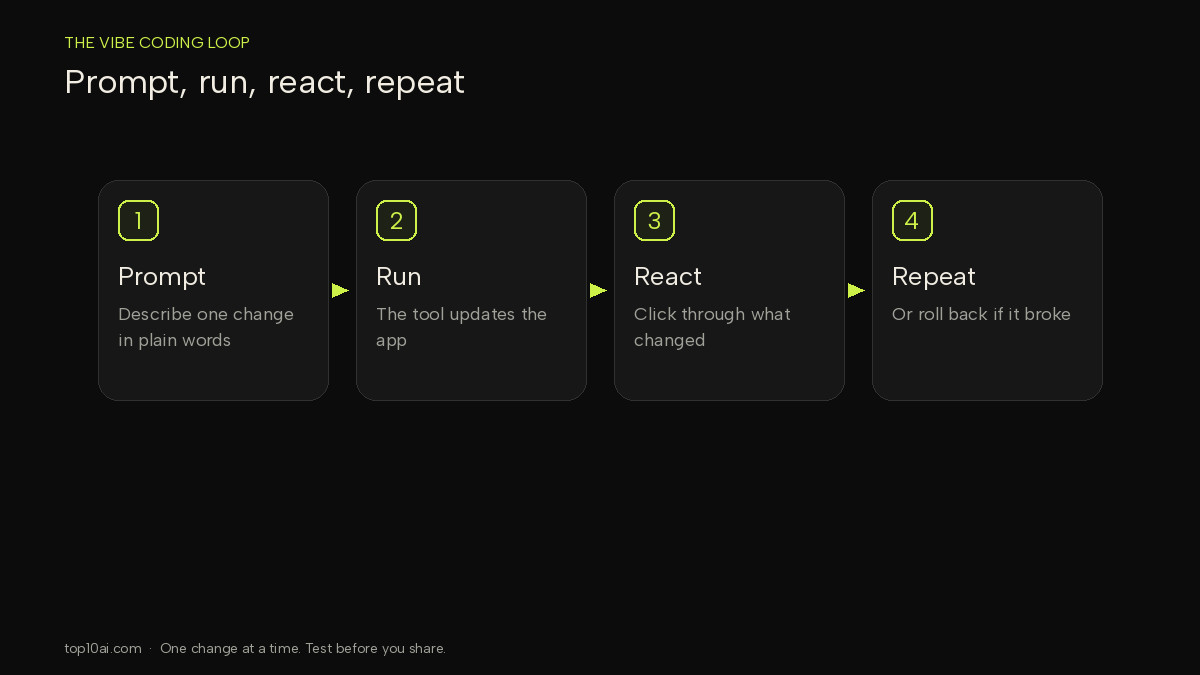
- Prompt. Say what you want in one request: what the app is, who it is for, or the single change to make next. Vague prompts (“make it better”) give vague results.
- Run. The tool writes or edits code and shows you a preview, a page, or a set of files.
- React. Click through what changed. Check the thing you asked for, and the things you did not ask it to touch. If something broke, roll back or describe the fault, rather than piling on a second feature.
- Repeat. Change one thing at a time until the first version does the job. Then stop and test it properly, especially logins, data and anything that talks to a payment or email service.
That loop is also why vibe coding feels fast, and why mistakes hide. If you never open the files, you will not see an API key sitting in the frontend, or a data rule that lets one account read another account’s records. The how-to guide walks through that loop in more detail; this page is only the pattern.
Vibe coding vs no-code vs traditional coding
These are overlapping ways to build software, not a ranking. A no-code builder can be used in a vibe-coding style (you describe the app in chat). A developer can vibe-code a prototype and then rewrite the important parts by hand. The useful distinction is what you are looking at, and who is responsible for hosting, logins and data.
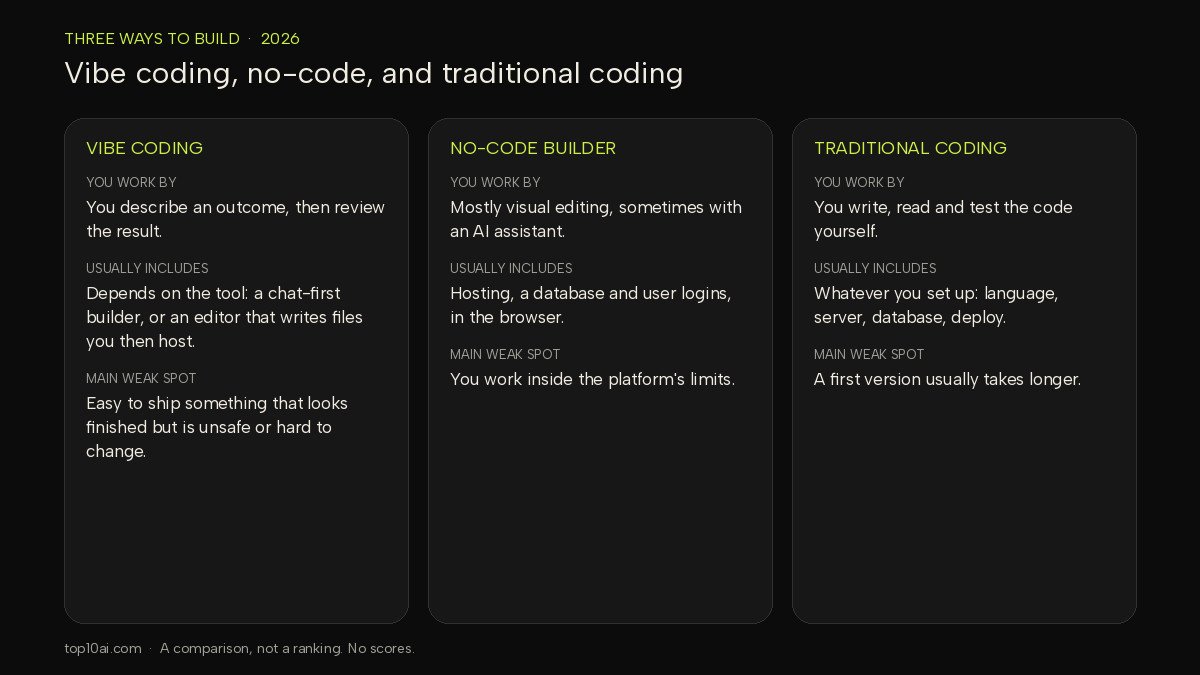
| Vibe coding | No-code builder | Traditional coding | |
|---|---|---|---|
| You work by | Describing an outcome in plain language, then reviewing the result | Mostly visual editing, sometimes with an AI assistant in the editor | Writing, reading and testing the code yourself |
| Usually includes | Depends on the tool: a chat-first app builder, or an AI editor that writes files you then have to host | Hosting, a database and user logins, in the browser | Whatever you set up: the language, the server, the database, the deploy |
| Fits well when | You want a first version of an idea quickly | You have never written code, or you want those built-in pieces from day one | You need full control, or the app has to meet a standard you must stand behind |
| Main weak spot | It is easy to ship something that looks finished but is unsafe or hard to change | You work inside the platform’s limits | A first version usually takes longer |
If you want help choosing a builder, see our AI app builder guide and Base44 vs Lovable. If you are choosing a coding agent instead, see Codex vs Claude Code. Building an agent is a different job from vibe coding an app; that path is in how to build an AI agent.
What people actually build with it
The honest list is modest, and it matches what the original post allowed for. People use vibe coding to:
- Prototype an idea — a first version you can click through and show someone, before you spend a lot of time on it.
- Build a personal or internal tool — a tracker, a simple form, a dashboard for a small team, where a failure is annoying rather than expensive.
- Stand up a landing page or a marketing site — a public page with a form, not a full product.
We are not attaching adoption percentages, typical build times, or success rates to that list. Those figures circulate easily on social posts and are not used as facts here. What the official sources do say is narrower: Karpathy framed it as a way to work on weekend projects; Collins recorded that the method had become a widely recognised term, and that the “revolutionary or reckless” debate was already part of the story in 2025.
The same week this page was checked, Slack published a 18 November 2026 announcement positioning Workflow Builder, Slackbot and agents as a no-code automation hub, and Google Labs opened a waitlist for Stitch Loop, a long-running product agent that writes code in a sandbox and opens pull requests for a person to approve. Those are official product announcements, not vibe-coding tutorials, and they are not evidence that a beginner app is ready to run a business. They do show how quickly “describe it and let the tool do the work” is moving into mainstream tools — and that the serious versions still put a human in front of anything that ships.
The real risks: exposed API keys, auth, data, maintenance
A vibe-coded app can look finished and still be unsafe. The problems are not exotic. They are the same web-security issues official docs have been warning about for years, and they are easier to miss when the workflow encourages you not to read the code. This is a short summary; the how-to guide’s section on the security part nobody tells beginners is the place for the fuller checklist and the OWASP categories in more detail.
- Exposed API keys. Secret keys for payments, email or AI APIs must stay on a server, not in the files a visitor can download. Stripe’s API keys documentation (checked 19 Nov 2026) says: “Only publishable keys are safe to expose outside your application’s back end.” It also says: “Store the key value securely in your server environment.” Resend’s guidance is the same: “Don’t share your API key with others or expose it in the browser or other client-side code,” and store keys in environment variables, never in version control. If you use Vite, its official env docs are explicit: variables prefixed with
VITE_“will be exposed in client-side source code after Vite bundling,” and “VITE_*variables should not contain sensitive information such as API keys.” A key that leaked this way should be revoked and replaced, not just deleted from the file. - Authentication and data access. A login screen is not enough. You still need a rule for who can see and edit each kind of record. The OWASP Top 10:2025 puts broken access control first, with authentication failures also on the list. Test with two accounts before you invite anyone else.
- Maintenance. Karpathy wrote that the code can grow “beyond my usual comprehension.” That is acceptable for a weekend experiment. It is a problem once customers, payments or personal data depend on the app, or once a small change starts breaking older features. At that point you need someone who can read the code, or you need to stop adding features until you understand what you already have.
None of this means vibe coding is “banned” or inherently unsafe. It means the tool will not do the security review for you. Builder platforms say the same thing in their own docs, as the next section notes.
A safer way to start: a builder with backend and auth built in
If you have never written code, the lower-risk first step is a no-code AI app builder that already includes hosting, user logins and a database. You still have to set permissions and test, but you are not also inventing a server, a login system and a place to put secrets. Two options with official docs on those pieces are Base44 and Bubble. This is not a ranking of those tools; both have a free plan, and plan details change, so confirm the current figures on each vendor’s pricing page (checked 19 Nov 2026: Base44 pricing, Bubble pricing).
Base44. Base44’s security overview (checked 19 Nov 2026) describes built-in authentication, data access rules, a secrets vault that is “only accessible from your app’s backend,” a security scan that looks for “credentials left in the wrong place” and “data that is too open,” and rate-limiting on public endpoints by default. The same page is direct about the limit: “You are responsible for your app’s security settings. Base44 provides the tools, but always review your permissions and run a security scan before you publish.”
Bubble. Bubble’s security manual (checked 19 Nov 2026) covers privacy rules for data, page security, and the fact that generated HTML, CSS and JavaScript are downloaded to the user’s device, so keys placed in the wrong part of the app can be extracted. It also states the same limit in different words: “Your app’s security is ultimately in your hands.”
A short pre-launch checklist, drawn from those official pages and the vendor docs above:
- Keep secrets on the server. Put API keys in the builder’s secrets or environment settings, or in a backend-only variable — never in a prompt, a visible page, or a client-side variable such as one prefixed
VITE_. - Use environment variables, not hard-coded keys, and do not commit real keys to a repository.
- Check authentication. Sign in, sign out, reset a password, and confirm that a logged-out visitor cannot see private pages or records.
- Check data rules with two test accounts, so account A cannot see account B’s data.
- Respect rate limits and payment test modes if the app sends email, calls an AI API, or takes money. Use the provider’s test mode first.
- Run the builder’s own security scan if it has one, and do not ignore what it flags. Base44’s docs note that the publish panel can show a warning and still let you publish.
For the full beginner sequence — first prompt, iterating in small steps, and the longer test list — use the how to vibe code guide.
When to bring in a developer
A personal tool or a prototype can stay in this workflow for a long time. Bring in someone who reads code for a living when any of these is true:
- Real money, health information, financial records, or data covered by privacy law is involved.
- You keep going in circles: the same bug returns, or each new feature breaks an old one.
- You no longer understand how the app works — the situation Karpathy described when the code grows past “usual comprehension.”
- Other people depend on it every day, so uptime, backups and updates are now real jobs.
- You need something the tool cannot do, such as a custom integration or a compliance review.
That list is expanded, with more context, in the how-to guide’s section on when to stop vibe coding and hire a developer. A vibe-coded prototype is still a useful brief for that person. It shows what you want more clearly than a written description.
FAQ
Is vibe coding real coding?
It produces real software — pages, data and, in many tools, real source files — but the way you work is different from writing that code yourself. You describe the outcome and review the result. Karpathy’s original description included accepting changes without reading them, which is exactly why the maintenance and security caveats matter. The code is real. The review still has to be real too.
Is vibe coding safe?
Not automatically. Official docs from Stripe, Resend, Vite, OWASP, Base44 and Bubble all treat secret keys, logins and data rules as the app builder’s job, not something the AI guarantees. A first version can be safe enough for a private prototype if you keep secrets on the server, test logins and data access, and stay on dummy data. It is not automatically safe for customers or payments. See the risks section above, and the longer checklist in the how-to guide.
Can beginners do it?
Yes. You do not need to be a developer to describe an app and review what the tool built. Beginners are better off starting with a no-code AI app builder that already includes hosting, logins and a database, and with a small project that does not handle real payments or other people’s personal data. The how-to guide is written for that starting point.
What are the best tools for vibe coding?
It depends on whether you want a chat-first app builder, a visual no-code editor, or an AI code editor that works on files. For a side-by-side comparison, read our vibe coding tools guide for the current list. This page does not rank them.
Related reading
- How to vibe code: a beginner step-by-step guide
- Vibe coding tools compared for non-developers
- AI app builders for non-coders
- Base44 vs Lovable
- How to build an AI agent
- Codex vs Claude Code
Sources
- All sources accessed 19 Nov 2026 (Asia/Nicosia).
- Andrej Karpathy, original “vibe coding” post on X (2 February 2025)
- Collins Dictionary: Word of the Year 2025 (6 November 2025)
- OWASP Top 10:2025
- Stripe: API keys and Resend: How to handle API keys
- Vite: Env Variables and Modes
- Base44 security overview and Base44 pricing
- Bubble Manual: Security and Bubble pricing
- Slack: Bring Agents Into Your Workflows, Right in Slack (18 November 2026)
- Google Labs: Introducing Stitch Loop (18 November 2026)
Find the Right AI Tool for You
Not sure which tool fits your workflow? Take our 30-second finder quiz and get a recommendation.