Claude Code vs Cursor (2026): Which AI Coding Tool Fits How You Build?
Claude Code vs Cursor, checked 23 Nov 2026: terminal agent vs AI-first editor, multi-file agent work, official pricing and limits, and who each suits.
Affiliate disclosure: Some links on this page are affiliate links. Top10AI may earn a commission if you sign up through them, at no extra cost to you. Only the Base44 and Bubble “try” links in the “Not a developer?” section are partner links; every link to Anthropic, Cursor and Google is a plain link. Top10AI has no affiliate deal with Anthropic or Cursor. See how we rate for the editorial policy.
Claude Code and Cursor both promise the same thing: describe a change, and an AI agent reads your code, edits the files and runs the commands to get it done. The difference is where that agent lives. Claude Code is Anthropic’s agent, built to run from your terminal and plug into the tools you already use. Cursor is an AI-first code editor, where the agent, the autocomplete and the files all sit in one app.
This is a head-to-head decision guide, checked 23 Nov 2026. Every plan, price and feature below comes from Anthropic’s, Cursor’s and Google’s own documentation and pricing pages on that date, linked where we use them. Top10AI did not run its own tests for this article, and there are no scores, badges or star ratings here. If you are choosing between Claude Code and OpenAI’s agent instead, see Codex vs Claude Code. If you want a full walkthrough of Cursor on its own, see our Cursor AI review.
Quick verdict: Claude Code vs Cursor at a glance
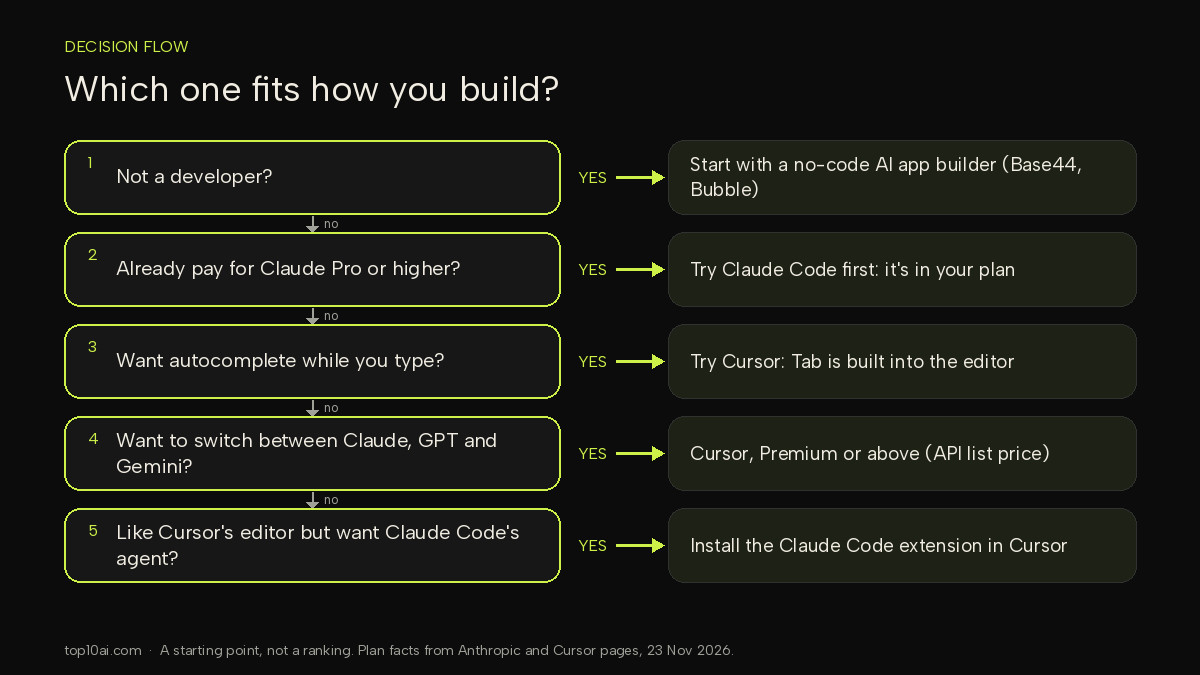
- Pick Claude Code if you already pay for Claude Pro or higher, you like working in a terminal, and you want one agent that behaves the same in your terminal, your editor, a desktop app and the browser.
- Pick Cursor if you want the editor itself to be the AI product: autocomplete as you type, an agent in the side panel, and a choice of models from several AI labs in one place.
- Use both if you like Cursor’s editor but want Claude Code’s agent: Anthropic’s docs list a direct install link for the Claude Code extension in Cursor.
- Not a developer? Neither tool hosts your app for you. A no-code builder such as Base44 or Bubble is usually the easier start (see the section below).
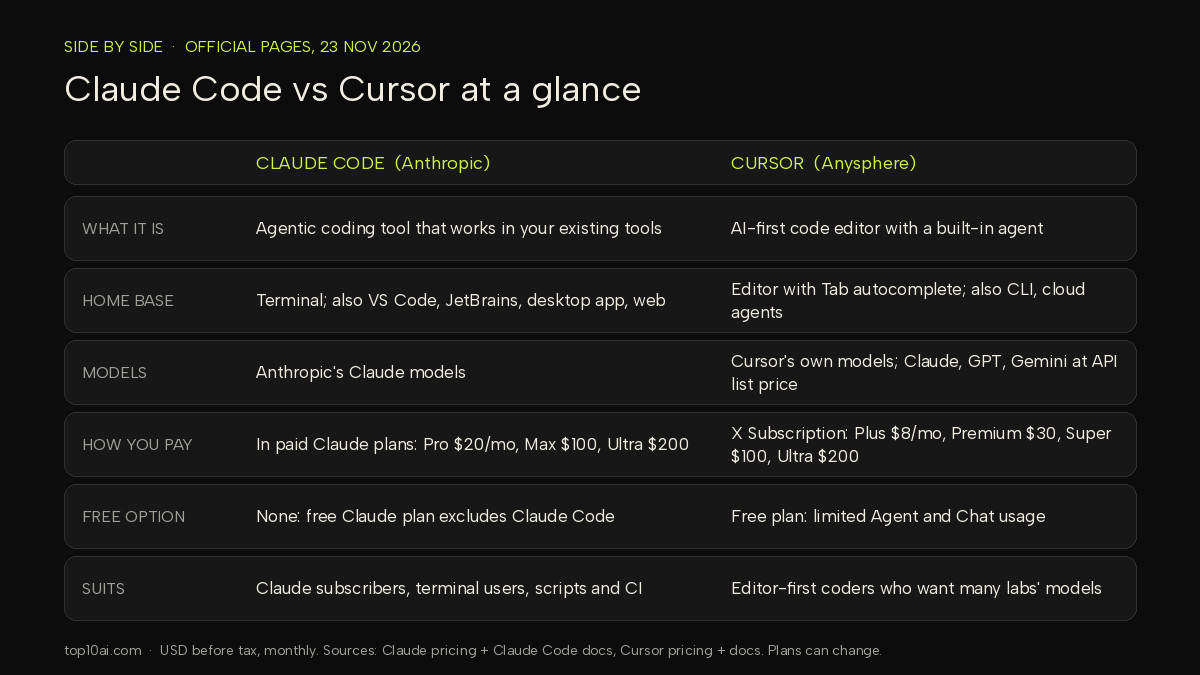
| Claude Code (Anthropic) | Cursor (Anysphere) | |
|---|---|---|
| What it is | An agentic coding tool that works in your existing tools | An AI-first code editor with a built-in agent |
| Main workflow | Terminal-first: run claude in a project folder and give it tasks |
Editor-first: write code with Tab autocomplete, hand bigger jobs to Agent |
| Also runs in | VS Code and JetBrains extensions, a desktop app, the web, Slack, GitHub Actions and GitLab CI/CD | A CLI, cloud agents on web and mobile, JetBrains (via ACP), Slack and GitHub |
| Models | Anthropic’s Claude models | Cursor’s own models included; Claude, GPT and Gemini as paid add-on usage |
| How you pay | Included in paid Claude plans, sharing one usage pool with Claude chat (Claude pricing) | Sold as part of The X Subscription, with a weekly usage pool (Cursor pricing) |
| Free option | No: the free Claude plan does not include Claude Code | Yes: a Free plan with limited Agent and Chat usage |
How Claude Code works
Anthropic’s Claude Code overview describes it as “an agentic coding tool that reads your codebase, edits files, runs commands, and integrates with your development tools.” You install it, open a terminal in your project, type claude, and describe what you want. Claude reads the relevant files, proposes or makes the edits, runs commands such as tests, and reports back.
The terminal is the home base, but not the only door in. The same docs list a terminal CLI, IDE extensions for VS Code and JetBrains, a desktop app and a web version, and say: “Each surface connects to the same underlying Claude Code engine, so your repo’s CLAUDE.md files, settings, and MCP servers work across all of them.” That is the main reason people choose it: you set up your project instructions once, in a plain CLAUDE.md file, and the agent behaves the same wherever you start it.
A few details matter in daily use:
- Permission modes. You control how much Claude can do without asking. Plan mode “tells Claude to research and propose changes without making them”, and you switch modes with Shift+Tab.
- Undo. Claude Code’s checkpointing captures your code before each prompt, and
/rewindopens a menu to roll edits back. - Scripts and CI. Passing
-pwith a prompt runs Claude Code non-interactively, which is how teams wire it into scripts and pipelines such as GitHub Actions. - Claude models only. Its model settings choose between Claude models, using aliases such as
opus,sonnetandhaiku. If you want GPT or Gemini, this is not the tool for switching between them.
How Cursor works
Cursor starts from the other end. It is a code editor first, and the docs say its editor offers “the classic IDE with VS Code extensions and flexible screen splitting to see many files at once.” Cursor’s own homepage now calls it an “AI Coding Agent for Building Ambitious Software”, which tells you where the product is heading.
Inside the editor, there are two main ways to get help:
- Tab. Tab “is Cursor’s AI-powered autocomplete. It suggests code as you type, based on your recent edits, surrounding code, and linter errors.” Claude Code’s docs describe an agent you hand tasks to; we found no autocomplete feature in them.
- Agent. Cursor’s Agent “can complete complex coding tasks independently, run terminal commands, and edit code”, from a side panel in the editor.
Cursor has also grown beyond the editor. Its Agents Window, generally available since Cursor 3 on 2 April 2026, is an agent-first view for running many agents in parallel across projects. There is a Cursor CLI (you run agent in a terminal), JetBrains support through the Agent Client Protocol, and cloud agents that “run in isolated VMs in the cloud with full development environments instead of on your local machine.” For a deeper look at the editor itself, see our Cursor AI code editor guide.
The biggest practical difference is models. Cursor’s models and pricing docs say it “supports frontier models from OpenAI, Anthropic, Google, SpaceXSI, and more”, so you can pick a different model for different jobs. Claude Code works with one family: Anthropic’s Claude models.
Agentic tasks and multi-file edits
For a change that touches many files, such as a new feature, a migration or a refactor, the two tools have converged more than the terminal-versus-editor framing suggests. Both now offer the same basic toolkit, under slightly different names:
| Need | Claude Code | Cursor |
|---|---|---|
| Plan before editing | Plan mode (Shift+Tab or /plan) |
Plan Mode (Shift+Tab) |
| Undo the agent’s edits | Checkpoints and /rewind |
Checkpoints in the chat timeline |
| Project instructions | CLAUDE.md files |
Project Rules in .cursor/rules, or AGENTS.md |
| Split work across helpers | Subagents, each in its own context window | Subagents, and Projects with a coordinator agent |
| Parallel work without collisions | Git worktrees, one per session | Worktrees in the Agents Window |
| Hand off and come back later | Cloud sessions (Pro, Max, Ultra and Team) | Cloud agents (Premium and above) |
| Run from scripts or CI | claude -p |
agent -p |
So the real question is not which tool can do a multi-file edit. Both can. It is how you want to review the work:
- In Cursor, you watch the agent’s changes land in the editor you are already looking at, next to the files and diffs. Cursor’s Plan Mode docs give a useful tip for big jobs: if the result is wrong, “Revert the changes, refine the plan to be more specific about what you need, and run it again.”
- In Claude Code, you review in the terminal, or in the diff view of the VS Code extension or desktop app. Its subagents are pitched for side tasks that would flood the main conversation with search results or logs; the subagent works in its own context and returns a summary.
One caution applies to both. Cursor’s docs say its checkpoints “are stored locally and separate from Git”, and Anthropic’s checkpointing page has a section titled “Not a replacement for version control”. Commit your work to Git before you hand either agent a large task.
Pricing and limits (checked 23 Nov 2026)
Prices below are US dollars before tax, as listed on the official pages on 23 November 2026. Plans can change, so check the linked pages before you buy.
Claude Code
Claude Code has no separate price: it comes with a paid Claude plan. Anthropic’s setup page says “The free claude.ai plan does not include Claude Code access.” On Claude pricing:
- Pro: $20 a month billed monthly, or $17 a month with the annual discount ($200 billed up front). Includes Claude Code.
- Max: $100 a month, with 5x Pro usage.
- Ultra: $200 a month, with 10x Pro usage every week and no 5-hour limit for verified accounts.
- Team and Enterprise plans are also listed; see the pricing page for seat prices.
The limit to understand is the shared pool. Anthropic says Claude Code “shares the same usage limits as the rest of your plan, so your work in the terminal and your chats draw from one pool.” It also says most accounts have “a limit that resets on a rolling five-hour session window, and paid plans add weekly limits on top.” When you hit a limit you can wait, upgrade, or turn on usage credits on paid plans.
Cursor
Cursor’s models and pricing docs say: “Cursor is sold as part of The X Subscription, one subscription for Grok, Cursor, and X.” The plans listed on Cursor pricing:
- Free: $0, with limited Agent and Chat usage.
- Plus: $8 a month, Cursor’s own models only.
- Premium: $30 a month, with 4x Plus usage. Adds cloud agents and access to third-party models.
- Super: $100 a month (15x Plus usage). Ultra: $200 a month (50x Plus usage).
- Teams from $30 per seat a month, and custom Enterprise pricing.
Two details change the comparison. First, Cursor’s usage pool “refreshes weekly, so one heavy day doesn’t use up your month.” Second, if you want Claude inside Cursor, the docs say: “Third-party models like Claude, GPT, and Gemini aren’t part of the included pool.” On Premium and above they are billed at the model’s API list price from prepaid credit, and “Plus and Free don’t include third-party models.” Older Cursor plans (Pro, Pro+, Ultra and others) are listed as legacy plans that keep working as they are.
In practice: if most of your coding would run on Claude models anyway, a Claude plan covers Claude Code from the first prompt. If you want an editor with included usage on Cursor’s own models, and Claude only some of the time, Cursor’s plans are built for that.
Where Gemini 4 Neon and Codex fit
The coding-agent market moved again last week. On 18 November 2026, Google announced Gemini 4 Neon, saying: “Today, we’re introducing Gemini 4 Neon — bringing frontier-level intelligence with fast end-to-end task completion across complex software engineering, knowledge work, and science workflows.” Google’s post cites several coding benchmark results. We have not checked them independently, so we do not repeat them here.
What matters for this comparison is where you can use it. Cursor’s docs already list Gemini 4 Neon as “Google’s Gemini model for agentic coding”, available in Cursor as a third-party model, which means paid usage on Premium and above. Claude Code runs Claude models, so Gemini 4 Neon is not an option there. Google itself is rolling Neon out in its own tools, including Google Antigravity for paid Google AI Pro and Ultra subscribers.
That is the clearest structural split in this matchup: Cursor is a place to use many labs’ models; Claude Code is one lab’s agent, everywhere. If you are comparing Claude Code with OpenAI’s agent rather than with an editor, our Codex vs Claude Code guide covers that matchup, plans and all. For GitHub’s assistant against Cursor, see GitHub Copilot vs Cursor.
Who each one suits
Claude Code fits you if:
- You already pay for Claude Pro, Max or Ultra and want to use that plan for coding too.
- You live in a terminal, or you switch between editors and want the agent to work the same in each.
- You want to script the agent, run it in CI, or start a task in the cloud and check back later.
- You are happy working only with Claude models.
Cursor fits you if:
- You want AI in the editor while you type, not only an agent you hand tasks to.
- You want to try Claude, GPT and Gemini models from one app, and you are fine paying API list price for the third-party ones.
- You want to start free, or on a low-cost plan, with Cursor’s own models.
- You like managing several agents from one window, with diffs and pull requests in the same place.
Running both is officially supported. Anthropic’s VS Code extension docs give an “Install for Cursor” link, and the extension signs in with a paid Claude subscription or a Claude Console account. If you sign in with a Claude plan, Anthropic’s pricing page says Claude Code shares that plan’s usage limits.
Not a developer? Build with Base44 or Bubble
Claude Code and Cursor are built for people who work with code files, Git and a terminal. They help you write code; they do not host your app, run your database or manage user logins. If what you actually want is a working app, such as a booking form, a client portal or an internal tracker, a no-code AI app builder is usually the easier first step. You describe the app in plain English, and the builder takes care of hosting, logins and data.
Base44. Base44’s pricing page (checked 23 Nov 2026) says “You can start building with Base44 for free, with every core feature included”, and that paid plans scale by credits. It lists authentication and user management among its features, and says two-way GitHub sync exports the full source code to your own repo.
Bubble. Bubble’s manual says it “lets you turn your ideas into apps by combining the power of AI and visual development”, so you can generate an app and then adjust it in a visual editor. Its pricing page lets you start free.
New to building this way? Our explainer on what vibe coding is covers the idea and the real risks, and our vibe coding tools comparison covers more no-code options.
FAQ
Is Claude Code better than Cursor?
Neither is better for everyone. Claude Code suits people who want Anthropic’s agent in the terminal and across several tools, paid for through a Claude plan. Cursor suits people who want an AI editor with autocomplete and a choice of models. You can also run the Claude Code extension inside Cursor to get both.
Is Claude Code free?
No. Anthropic’s setup page says the free Claude plan does not include Claude Code. It is included from Claude Pro, which Claude’s pricing page listed at $20 a month billed monthly on 23 Nov 2026.
Can I use Claude models in Cursor?
Yes, on Cursor’s Premium plan and above. Cursor’s docs say third-party models like Claude, GPT and Gemini are not part of the included usage pool and are billed at the model’s API list price from prepaid credit. The Free and Plus plans do not include third-party models.
Can I run Claude Code inside Cursor?
Yes. Anthropic’s VS Code extension docs include an install link for Cursor. The extension signs in with a paid Claude subscription or a Claude Console account. If you use a Claude plan, Claude Code shares that plan’s usage limits.
Does Cursor have a free plan?
Yes. Cursor’s pricing docs list a Free plan at $0 with limited Agent and Chat usage. Paid plans start with Plus at $8 a month, which covers Cursor’s own models only.
Which is easier for beginners?
If you have never coded, neither: start with a no-code AI app builder such as Base44 or Bubble, which handle hosting, logins and data for you. If you are learning to code, Cursor’s editor shows the files and changes in front of you, which can be easier to follow than a terminal.
Related reading
- Codex vs Claude Code: which AI coding agent fits your work
- Cursor AI review
- Cursor AI code editor guide
- GitHub Copilot vs Cursor
- Vibe coding tools compared for non-developers
- What is vibe coding?
Sources
- All sources accessed 23 Nov 2026 (Asia/Nicosia).
- Anthropic: Claude Code overview, Setup, VS Code extension, Permission modes, Checkpointing, Subagents, Common workflows, Claude Code in the cloud, Run programmatically, Model configuration, Claude pricing
- Cursor: cursor.com, Pricing, Models and pricing, Agent, Plan Mode, Agents Window, Tab, CLI, Cloud agents, Rules, Worktrees, JetBrains, Gemini 4 Neon in Cursor
- Google: Introducing Gemini 4 Neon (18 November 2026)
- Base44: pricing; Bubble: manual and pricing
Find the Right AI Tool for You
Not sure which tool fits your workflow? Take our 30-second finder quiz and get a recommendation.