Seedance 2.5: What’s New, How to Try It, and the Best Alternatives (Nov 2026)
Seedance 2.5, checked 24 Nov 2026: what's new vs 2.0, where to try it, official pricing, and alternatives (Kling, Higgsfield, InVideo). No scores.
Affiliate disclosure: Some links on this page are affiliate links. Top10AI may earn a commission if you sign up through them, at no extra cost to you. Only the “try” links for Kling, Higgsfield and InVideo are partner links. Every link to ByteDance Seed, Dreamina, CapCut, BytePlus and other official documentation is a plain link. Top10AI has no affiliate deal with ByteDance or Seedance itself. See how we rate for the editorial policy.
Seedance 2.5 is ByteDance Seed’s current audio-video generation model. Official pages say it generates video and audio together in a single pass of up to 30 seconds, and the model now shows up not only in ByteDance’s own apps but also on partner platforms. This is a plain explainer, checked 24 Nov 2026, covering what Seedance 2.5 is, what changed versus Seedance 2.0, where official pages say you can actually use it, what those pages say it costs, and which alternatives to try when it is not available or the credits run out.
Every plan, price and feature below comes from the vendor’s own pages on that date, linked where we use them. Top10AI did not generate clips or run its own tests for this article, and there are no scores, badges or star ratings here. If you want a head-to-head rather than an explainer, see Seedance 2.5 vs Kling 4.0, Wan 3.0 vs Seedance 2.5 or Pika vs Seedance 2.5 vs Kling.
What is Seedance 2.5?
ByteDance Seed describes Seedance 2.5 as a next-generation audio-video joint generation model, built for 30-second storytelling with precise reference control and editing. The team announced it on 31 July 2026, as a successor to Seedance 2.0.
Quick facts (from official pages, checked 24 Nov 2026):
- Maker: ByteDance Seed.
- Announced: 31 July 2026.
- What it generates: Video and audio together, in one pass, according to the Seed homepage and the launch blog.
- Length: Up to 30 seconds in a single generation, “with the option to extend twice,” on the Seedance 2.5 homepage. The launch blog also describes “multiple rounds of extension” and says users can output videos lasting several minutes.
- References: The launch blog says you can input up to 30 images, 10 video clips and 10 audio clips in a single pass. Dreamina and CapCut describe this as up to 50 multimodal references, including images, video, audio and text. Higgsfield’s page also says up to 50 references, covering images and clips, not text.
- Editing: Timestamp-level control, plus green-screen, camera-perspective, white-model (clay-render) and reference-based editing, according to Seed’s official pages.
- Not a ranking: These are vendor claims, not Top10AI test results.
Dreamina’s 31 July 2026 newsroom post frames the same model as ByteDance’s video and audio model “for products like Dreamina,” and highlights longer clips, heavier referencing and more granular editing. That is the product in one sentence: a 30-second, reference-heavy, audio-video model that you edit by timestamp rather than by regenerating the whole take.
What’s new vs Seedance 2.0
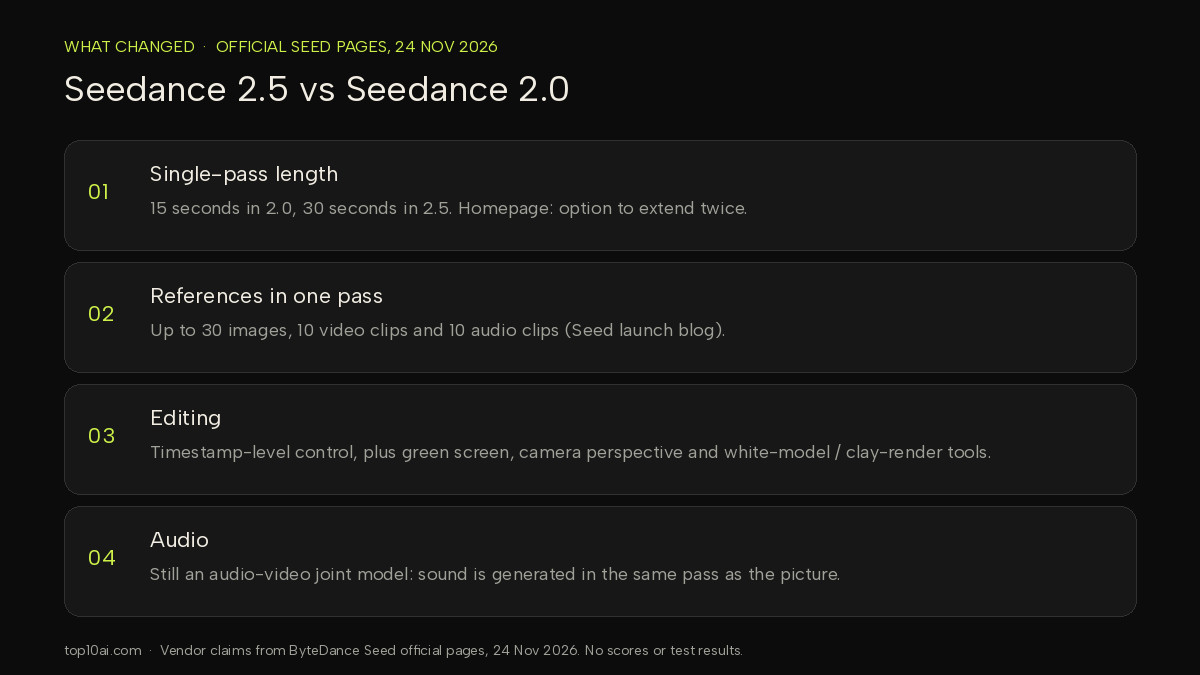
The Seed launch blog is the clearest official comparison, because it states the change in a single sentence: Seedance 2.5 “extends single-pass video generation from 15 to 30 seconds.” Everything else it lists is an upgrade on top of Seedance 2.0’s “unified multimodal audio-video joint-generation architecture.”
According to that announcement, the 2.5 update centres on three areas:
- Longer single takes, then extend. A 30-second clip can contain several connected shots (setup, development, turning point, resolution) rather than stretching one moment. The homepage’s wording is specific: you can extend twice. The blog also says multi-round extensions can keep the main characters, environments and pacing consistent and can produce videos lasting several minutes. Dreamina’s and CapCut’s product pages, checked the same day, describe a beta “Long Video Mode” that extends output to 180 seconds. That 180-second figure comes from those product pages, not from the Seed homepage, so treat it as a platform feature and confirm it in your own account.
- Heavier referencing. The official cap is 30 images, 10 videos and 10 audio clips in one pass, with stronger support for clay-render, motion and creative references. Dreamina’s pages add text to that mix and call the total “up to 50 multimodal references.”
- Timestamp editing. Seed says you can target audio and video at a specific timestamp, and it lists green-screen, camera-perspective and reference-based editing as enhanced tools for film and advertising work.
We are not attaching benchmark scores, “percent better” claims or quality ratings to this upgrade. Those do not appear as numbered results on Seed’s official pages, and we did not run our own tests.
Where to try Seedance 2.5
Only platforms whose own sites, checked 24 Nov 2026, say they offer Seedance 2.5 are listed here. Availability still depends on your region, plan and account, so confirm the model is selectable before you rebuild a workflow around it.
ByteDance’s own products
- Jimeng AI and Doubao Pro. The 31 July 2026 Seed announcement says Seedance 2.5 is rolling out on Jimeng AI, Doubao Pro “and other platforms,” and gives this path: Jimeng Web → Video Generation → Select Seedance 2.5, or Doubao Pro → Video Generation → Select Seedance 2.5.
- Dreamina. Dreamina’s Seedance 2.5 product page presents the model as available in Dreamina and, on the page we fetched today, uses “now live worldwide” language. The same site’s launch article dated 23 Oct 2026 (and the ByteDance newsroom post it mirrors) still says Seedance 2.5 would start rolling out for subscriber accounts belonging to people over 16 in Europe, Asia, the Middle East and South America. That sentence does not name the United States. We are not resolving the two wordings for you: check your own Dreamina account.
- CapCut. CapCut’s Seedance 2.5 for Video Editor page says the model is now live in CapCut, with native 30-second generation, up to 50 multimodal references, R2V motion control, synchronized stereo audio and Intelligent Edit Mode inside the editor. The same page’s FAQ says it is “rolling out to CapCut across Europe, Asia, the Middle East, and South America for subscriber accounts, with broader availability continuing to expand,” and that the model “appears as a selectable model as it becomes available in your region.”
Partner platforms that list Seedance 2.5 today
- Higgsfield. Higgsfield’s own page at higgsfield.ai/seedance-2.5 lists Seedance 2.5, including 30-second generation, up to 50 references (images and clips, not text), synced audio and region-level editing. Seed’s API partner list also names Higgsfield. If you want to try Seedance 2.5 on Higgsfield, use the partner link below.
- InVideo. InVideo’s pricing page, checked 24 Nov 2026, lists Seedance 2.5 as a premium-quality model on paid plans (it is not included on Starter). That makes InVideo a place to run Seedance 2.5 inside a timeline editor, not only an alternative to it.
The July announcement also said API access would come via BytePlus ModelArk. As of today, ByteDance Seed publishes official Seedance API prices and a partner list on the Seedance API page linked above. We did not treat a third-party host as official unless that host’s own site named Seedance 2.5.
Try Seedance 2.5 on Higgsfield Try Seedance 2.5 on InVideo
Pricing and free options (checked 24 Nov 2026)
There is no single Seedance 2.5 price. You pay the plan or API rate of the platform you use, and those rates change. The figures below are what the official pages showed on 24 Nov 2026. Confirm the amount and credit charge displayed at checkout before you pay.
Dreamina
Dreamina’s Seedance 2.5 pricing page (article dated 27 Oct 2026, still live today) describes a limited-time US offer: the eligible US Basic first payment is $0.29 for a recurring monthly plan, then the listed US renewal price is $15/month. That first month includes 1,575 credits. The same page says Seedance 2.5 at the listed 720p settings uses 37 credits per generated second, and it states clearly that “all month long” does not mean unlimited generations. Users who already redeemed a previous 90%-off offer are not eligible. Regional prices and allowances vary. The offer start date on the page is 21 Oct 2026; because it is a limited-time promotion, treat it as current only while the page and checkout still show it.
The Dreamina launch article also uses the signup line “Get started for free *No credit card required.” That is a start-for-free claim for signing in, not a claim that Seedance 2.5 generations are unlimited or always free.
CapCut
CapCut’s Seedance 2.5 feature-page FAQ, checked 24 Nov 2026, says: you can start creating AI videos with Seedance 2.5 using free daily credits at no cost, and that CapCut Pro unlocks higher generation limits, priority processing, and premium features like 4K output and the 180-second Long Video Mode. The page does not publish a numeric Pro price in the text we captured, so we are not inventing one. Check CapCut’s own plan screen for the current Pro price.
Higgsfield
Higgsfield’s official pricing.md is dated 24 Nov 2026 and lists US-dollar prices for customers in the United States (other regions can differ). Individual plans include a Free plan with 0 credits and access to selected models only, Starter at $19/month with Seedance 2.0 Fast and 2.0 Mini access, and Plus and Ultra plans that include “All Seedance models.” As of 24 Nov 2026, the Plus and Ultra figures below are Black Friday sale prices (up to 69% off); that sale ends 25 Nov 2026 00:00 UTC (02:00 Asia/Nicosia). Plus is $40 for the first month then $59/month, or $30/month billed annually ($360 a year). Ultra starts at $75 for the first month then $129/month for 3,000 credits, or $45/month billed annually ($540 a year), with higher credit tiers above that. The Scale business plan lists a time-limited unlimited Seedance 2.5 window: up to 720p and up to 25 seconds, on the web only, 7 days on monthly billing or 30 days on annual billing, one generation at a time per active member. Unlimited and free generations work only on higgsfield.ai, not in MCP/CLI, Canvas or Supercomputer.
InVideo
InVideo’s pricing page, checked 24 Nov 2026, says Starter does not include Seedance 2.5. Seedance 2.5 is listed from the Plus plan upward, and the page says regular quality uses Seedance 2.0 Fast while premium quality uses Seedance 2.5. The Black Friday sale prices shown that day, under an “Up to 75% off” banner, are $10 per seat/month for Starter (billed $120 a year; the monthly rate shown is $20), $24 per seat/month for Plus (billed $288 a year; the monthly rate shown is $60), and $62.50 per seat/month for Max on a two-year term (the monthly rate shown is $250). The same page lists approximate credit use of ~56 credits per 5 seconds for Seedance 2.5 at 720p, ~96 credits per 5 seconds at 1080p, and ~24.5 credits per 5 seconds for Seedance 2.5 Draft. Those are InVideo’s figures, not a Top10AI measurement.
Official Seedance API
ByteDance Seed’s Seedance API official pricing, checked 24 Nov 2026, lists these online-inference rates for Dreamina-Seedance-2.5, in US dollars per million tokens:
- 480p and 720p: $12.84 without video input, $7.68 with video input.
- 1080p: $14.04 without video input, $8.40 with video input.
The same page gives this estimate: token unit price × token consumption, where estimated token consumption is (input video duration + output video duration) × width × height × frame rate / 1024. Check the BytePlus ModelArk console as well, because console rates can be presented differently from this list.
Prompting tips for consistent characters and audio
The tips below are paraphrased or quoted from official Seed documentation and official example prompts. They are not results from clips we generated, and they are not a guarantee of how the model will behave on your account.
- Write the prompt like a shot list, not a single adjective. Official Seed examples specify aspect ratio, length, time ranges, camera moves, and what happens in each beat. One launch-blog prompt begins: “Using @Video 1, render the green-screen background, obstacles, wardrobe, and supporting characters. 0–4s: outdoor training… 4–10s: locker room… 10–15s: international match…”
- Say which reference does which job. Another official R2V example assigns roles explicitly: “Reference the camera work, composition, shot scale, spatial relationships, part positions, model structure, assembly order, and motion paths from @Clay Render 1. Reference the materials, lighting, color, reflections, and atmosphere from @Image 1, and turn the clay render into a high-end, photorealistic car assembly sequence.”
- Use references for identity, then extend carefully. Seed’s launch blog says the model’s extensions are meant to keep main characters, environments and narrative pacing consistent as you append shots. Lock the face, wardrobe, location and sound with references on the first take, then extend from that output rather than starting a new prompt from scratch.
- Edit a timestamp instead of rolling the whole clip. Official Seed, Dreamina and CapCut pages all describe timestamp-level or region-level edits so you can change one moment, character or object without regenerating the entire take.
- Be explicit about sound. Seedance 2.5 is an audio-video model. Official product pages say audio is generated in the same pass as the picture. If you need a quiet bed, a synced effect, or no random background music, say so in the prompt. CapCut’s page also says the model aims to avoid random subtitles and unwanted BGM; that is a vendor claim, not a test result of ours.
Seedance 2.5 vs Kling vs other generators
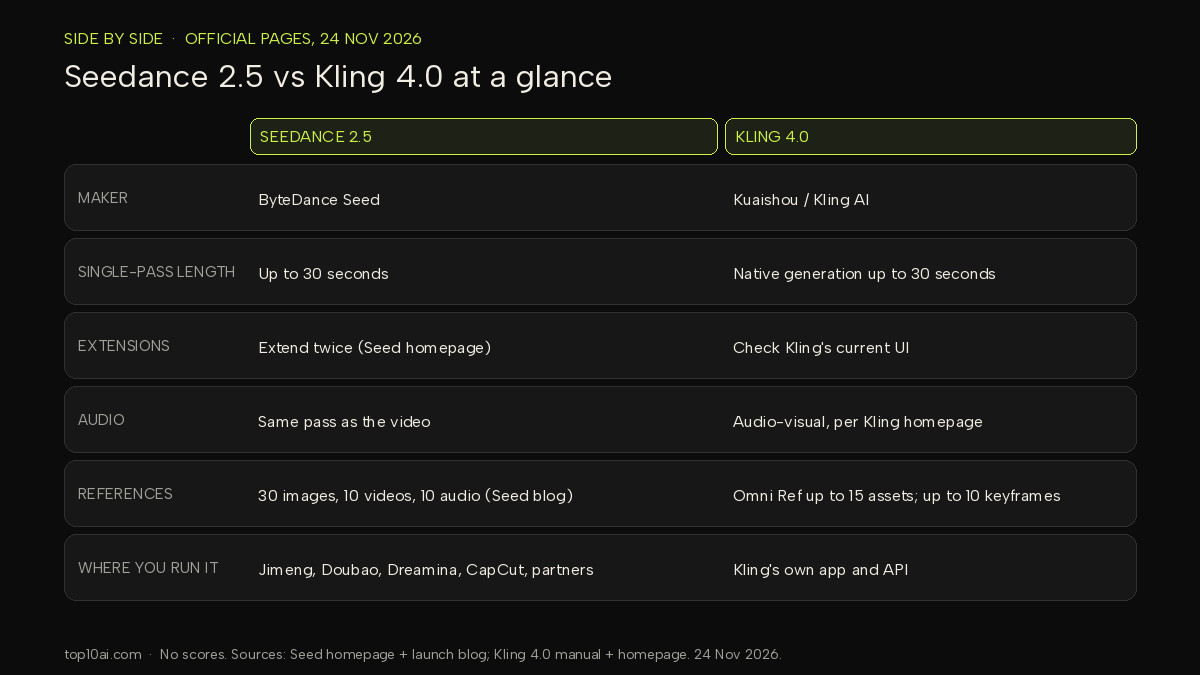
This is a feature snapshot from official specs, checked 24 Nov 2026, not a scored verdict. For a full Shorts-focused comparison, use Seedance 2.5 vs Kling 4.0. For other model matchups, see Wan 3.0 vs Seedance 2.5 and Pika vs Seedance vs Kling. This page does not try to rank a “best AI video generator”; that list lives at best AI video generator and currently does not cover Seedance.
| Seedance 2.5 (ByteDance Seed) | Kling 4.0 (Kuaishou / Kling AI) | |
|---|---|---|
| What it is | Audio-video joint generation model | Native multimodal video creation model, per Kling’s 4.0 user manual |
| Single-pass length | Up to 30 seconds (Seed homepage) | Native generation of up to 30 seconds (Kling 4.0 manual) |
| Extensions | Homepage: option to extend twice. Seed blog: multi-round extensions, videos lasting several minutes. Dreamina/CapCut product pages: beta Long Video Mode up to 180 seconds | Kling 4.0 Video Extension is listed as Coming Soon in the 4.0 manual (extend multiple times, up to 2 minutes) |
| Audio | Generated in the same pass as the video (Seed official pages) | Kling’s homepage positions Kling 4.0 as “Audio-Visual Performance” |
| References | Up to 30 images, 10 videos and 10 audio clips (Seed blog); up to 50 multimodal refs on Dreamina and CapCut pages (including text); Higgsfield: images and clips, not text | Omni Reference of up to 15 reference assets in total, and up to 10 keyframe inputs (Kling 4.0 manual) |
| Editing | Timestamp-level edits, green screen, white-model / clay-render, reference-based editing | Video editing of up to 5 clips (1 primary), each 3–30 seconds, maximum total duration 30 seconds (Kling 4.0 manual) |
| Where you run it | Jimeng, Doubao Pro, Dreamina, CapCut, Higgsfield, InVideo, and the Seedance API / ModelArk, subject to account access | Kling’s own app and API at kling.ai |
| API price snapshot (official pages, 24 Nov 2026) | Seed list: $12.84 / $7.68 per million tokens at 480p–720p (without / with video input); $14.04 / $8.40 at 1080p | Kling official API table: Kling 4.0 with no input video is $0.157/s at 720p, $0.235/s at 1080p, $0.549/s at 4K (Kling video pricing). Consumer membership prices should be checked on Kling’s plan page. |
Higgsfield and InVideo appear in the next section as well, because they are platforms that can run Seedance 2.5 and other generators. They are not a third model in this table.
Best alternatives: Kling, Higgsfield, InVideo
Use this section when Seedance 2.5 is not on your account, your credits are gone, or you want a different workflow. These are the three alternatives named in the brief, with partner links only for those three.
Kling 4.0
Kling is the closest like-for-like alternative: another 30-second-class, reference-driven video model with audio, running in its own app rather than in Dreamina or CapCut. Official docs highlight Omni Reference (up to 15 assets) and up to 10 keyframes. Choose Kling if you already work in the Kling app, you want Kling’s Omni/keyframe workflow, or Seedance is not offered on your Dreamina or CapCut account. See also our Seedance 2.5 vs Kling 4.0 comparison for Shorts-style jobs.
Higgsfield
Higgsfield is both a place to run Seedance 2.5 and an alternative workspace when you want other models, team plans, or a time-limited unlimited Seedance 2.5 window on the Scale plan (terms above, dated 24 Nov 2026). Individual Plus and Ultra plans list “All Seedance models”; Starter lists Seedance 2.0 Fast and Mini only. Use Higgsfield if you want Seedance 2.5 outside Dreamina or CapCut, or if you already pay for a Higgsfield plan.
InVideo
InVideo is a timeline editor that, on Plus and higher, lists Seedance 2.5 as its premium-quality video model (Starter does not include it). That is useful if you want generation and editing in one editor, with captions, stock and team seats, rather than a pure model playground. Check the live pricing page for current credit rates and plan gates.
FAQ
What is Seedance 2.5?
Seedance 2.5 is ByteDance Seed’s audio-video generation model, announced on 31 July 2026. Official pages say it can generate up to 30 seconds in a single pass, accept a large set of image, video and audio references, and edit specific timestamps rather than regenerating the whole clip.
What is new in Seedance 2.5 compared with Seedance 2.0?
The official launch blog says single-pass generation went from 15 seconds in Seedance 2.0 to 30 seconds in Seedance 2.5. It also describes upgraded multimodal referencing (up to 30 images, 10 video clips and 10 audio clips in one pass) and timestamp-level editing, including green-screen and camera-perspective tools.
How long can a Seedance 2.5 video be?
ByteDance Seed’s homepage says up to 30 seconds in one generation, with the option to extend twice. The launch blog also describes multi-round extensions and videos lasting several minutes. Dreamina’s and CapCut’s product pages, checked 24 Nov 2026, describe a beta Long Video Mode of up to 180 seconds. Confirm the limit shown in your own app.
Is Seedance 2.5 free?
Not as a generally free product. CapCut’s official FAQ says you can start with free daily credits. Dreamina’s launch page says you can get started for free with no credit card required, but its US Basic offer is a $0.29 first month then $15/month, with a limited credit allowance, not unlimited generations. Higgsfield’s Free plan lists 0 credits and selected models only; Seedance 2.5 is listed on higher Higgsfield plans. InVideo does not include Seedance 2.5 on Starter. Always check the plan screen in front of you.
Where can I try Seedance 2.5?
The official announcement lists Jimeng AI and Doubao Pro. Dreamina and CapCut document the model on their own product pages. Higgsfield and InVideo also list Seedance 2.5 on their own sites as of 24 Nov 2026. Access still depends on your region, plan and account.
Is Seedance 2.5 available in the United States?
It depends on the platform. Dreamina’s 23 Oct 2026 launch article still describes a subscriber rollout in Europe, Asia, the Middle East and South America and does not name the United States in that sentence, while Dreamina’s current product page uses “live worldwide” language. CapCut’s FAQ describes a regional rollout with broader availability still expanding. Higgsfield and InVideo list Seedance 2.5 on their US-facing pricing pages today. Check your own account rather than assuming access.
How many references can I use in Seedance 2.5?
ByteDance Seed’s launch blog says up to 30 images, 10 video clips and 10 audio clips in a single pass. Dreamina and CapCut official pages describe this as up to 50 multimodal references, including images, video, audio and text. Higgsfield’s page says up to 50 references, covering images and clips, not text.
How does Seedance 2.5 compare with Kling?
Both official docs describe 30-second-class generation with native audio and multi-asset references. Seedance 2.5 is ByteDance’s model, used in Jimeng, Doubao, Dreamina, CapCut and some partner apps. Kling 4.0 runs in Kling’s own app and API, with Omni Reference of up to 15 assets and up to 10 keyframes. This page does not pick a winner; see our Seedance 2.5 vs Kling 4.0 comparison for a Shorts-focused walkthrough.
Related reading
- Seedance 2.5 vs Kling 4.0 for Shorts
- Wan 3.0 vs Seedance 2.5
- Pika vs Seedance 2.5 vs Kling
- Kling AI vs CapCut
- Higgsfield AI review
- InVideo AI review
- CapCut review
- Best AI video generator
Sources
All sources checked 24 Nov 2026 (Asia/Nicosia). Features and prices can change; confirm them on the live vendor page.
- ByteDance Seed: Seedance 2.5 model page
- ByteDance Seed: Introducing Seedance 2.5 (31 July 2026)
- ByteDance Seed: Seedance API official pricing and partners
- ByteDance newsroom: Dreamina Seedance 2.5 and Dola Seedream 5.0 Pro (31 July 2026)
- Dreamina: Seedance 2.5 product page
- Dreamina: Seedance 2.5 launch article (23 Oct 2026)
- Dreamina: Seedance 2.5 pricing (article dated 27 Oct 2026)
- CapCut: Seedance 2.5 for Video Editor
- Higgsfield: Seedance 2.5
- Higgsfield: official pricing.md (updated 24 Nov 2026)
- InVideo: pricing
- Kling AI homepage (Kling 4.0)
- Kling: 4.0 Video User Manual
- Kling: official video API pricing
Find the Right AI Tool for You
Not sure which tool fits your workflow? Take our 30-second finder quiz and get a recommendation.